React Contact Us Page with a Form and Contact Details
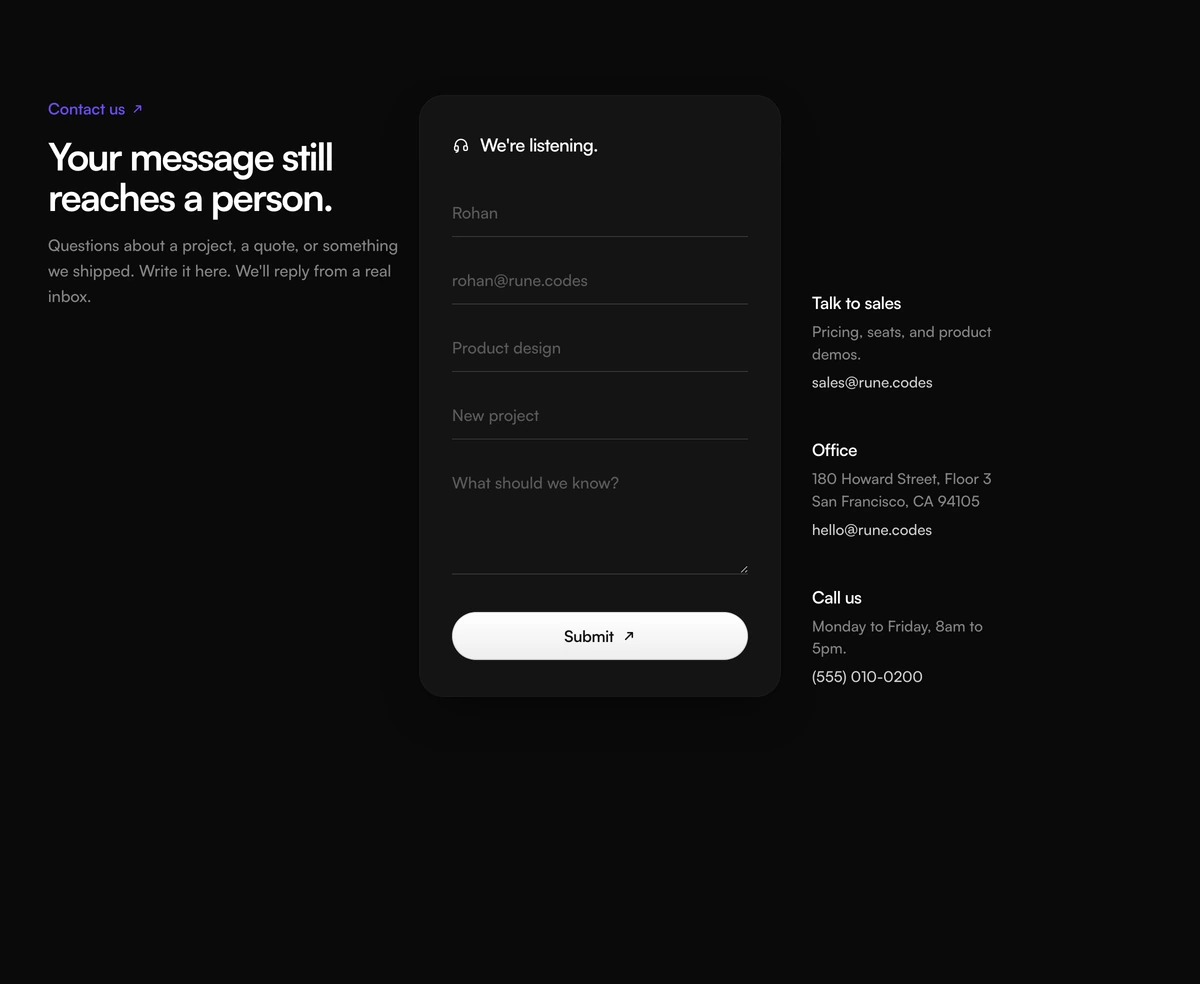
ProEverything a contact us page needs in one section. An intro on the left with a violet eyebrow and a two line headline, a white card in the middle with fields for name, email, industry, subject and message, and a column on the right with a sales email, an office address and a phone number, each ready to tap.
A form and every other way to reach you
Contact Section with Three Column Form is a React and Tailwind CSS contact us page section that combines an introduction, a five field contact form and direct contact details for sales, the office and phone. It works in Next.js or any React app, in light and dark.
Not everyone wants to fill in a form. Some visitors want an email address to forward, an address for a visit or a number to call. Showing those channels beside the form, rather than in the footer, lets people choose how to reach you and makes the company feel reachable.
The form asks for industry and subject as well as the basics, which helps route messages to the right person without a long questionnaire.
The three zones
Introduction
A violet eyebrow with an arrow, a two line headline and a short description.
Form card
A white card titled with a headset icon, containing underlined inputs for name, email, industry and subject, a message area and a full width pill button.
Hidden labels
Inputs use placeholders on screen with labels hidden visually but present for screen readers.
Contact channels
Sales, office and phone, each a heading, a line of text and a link. Email uses mailto and phone uses tel, so both open the right app on a phone.
Responsive layout
On large screens the channels sit to the right of the form card; on smaller screens they stack below it.
When three columns help
Use it when
- A full contact page for a company with sales, an office and a phone line.
- You want messages to arrive with an industry and subject for routing.
- Visitors often prefer to email or call directly.
- Light and dark themes both need to look right.
Skip it when
- You only want a short form in a landing page; this is a full page section.
- You do not have an office or phone line to list; the channel column would be thin.
- Your headline lines are long. Each line is kept on one row and can overflow on small phones.
- You need a dropdown for industry; the field is free text.
Wire the form, set the channels
onSubmit receives the form event after the default is prevented. The fields are named name, email, industry, subject and message, so new FormData(event.currentTarget) gives you everything to send. The block has no loading or success state; render a confirmation yourself after the request resolves.
sales, office and phone each take a heading, body, href and label. The office body accepts a line break for a two line address. Replace the sample addresses and the 555 phone number with your own before launch.
npx wensity@latest add contact-section-with-three-column-form --type block
"use client";import { ThreeColumnFormContact } from "@/components/wensity/blocks/contact-section-with-three-column-form";export function ContactPage() {return (<ThreeColumnFormContactheadline={"Talk to a person,\nnot a ticket queue."}submitLabel="Send message"sales={{ heading: "Sales", body: "New projects and pricing.", href: "mailto:sales@northwind.studio", label: "sales@northwind.studio" }}office={{ heading: "Office", body: "14 Canal Street\nManchester M1 3HE", href: "https://maps.example.com/northwind", label: "Get directions" }}phone={{ heading: "Phone", body: "Weekdays, 9am to 5pm.", href: "tel:+441610000000", label: "+44 161 000 0000" }}onSubmit={async (event) => {await fetch("/api/contact", { method: "POST", body: new FormData(event.currentTarget) });}}/>);}
Props
| Prop | Type | Default | Description |
|---|---|---|---|
onSubmit | (event: FormEvent<HTMLFormElement>) => void | - | Your send logic, called with the form event. |
sales / office / phone | { heading; body; href; label } | - | The three channels. Use mailto: and tel: links so they open the right app. |
headline | string | - | Two short lines separated by a newline. Lines do not wrap. |
eyebrow / description / formTitle | string | - | Intro label, intro paragraph and the title on the form card. |
submitLabel | string | "Submit" | Button text. A specific verb, such as Send message, reads better than Submit. |
Details to check
Two palettes
A light grey section with a white card in light mode, and near black with a dark grey card in dark mode, with the violet eyebrow kept in both.
Labels for assistive tech
Each input has a label, hidden visually. Sighted users rely on placeholders, which disappear while typing, so keep placeholders short and obvious.
No required fields
Nothing stops an empty submission. Add required to the inputs or validate in onSubmit.
Tappable channels
mailto and tel links make the channel column useful on phones without extra code.
Static
No animation and no dependencies beyond clsx and tailwind-merge.
Block details
- Category
- Contact Sections
- Renders
- CSS only. Paints as soon as the stylesheet arrives
- Theme
- Follows the site theme in light and dark
- Dependencies
clsxtailwind-merge- Source
- 284 lines, 9 KB in one file
- Install
wensity add contact-section-with-three-column-form --type block- Tags
- light, dark, contact, form, three-column, support
- Last updated