React Contact Section with a Map Illustration, Address and Form
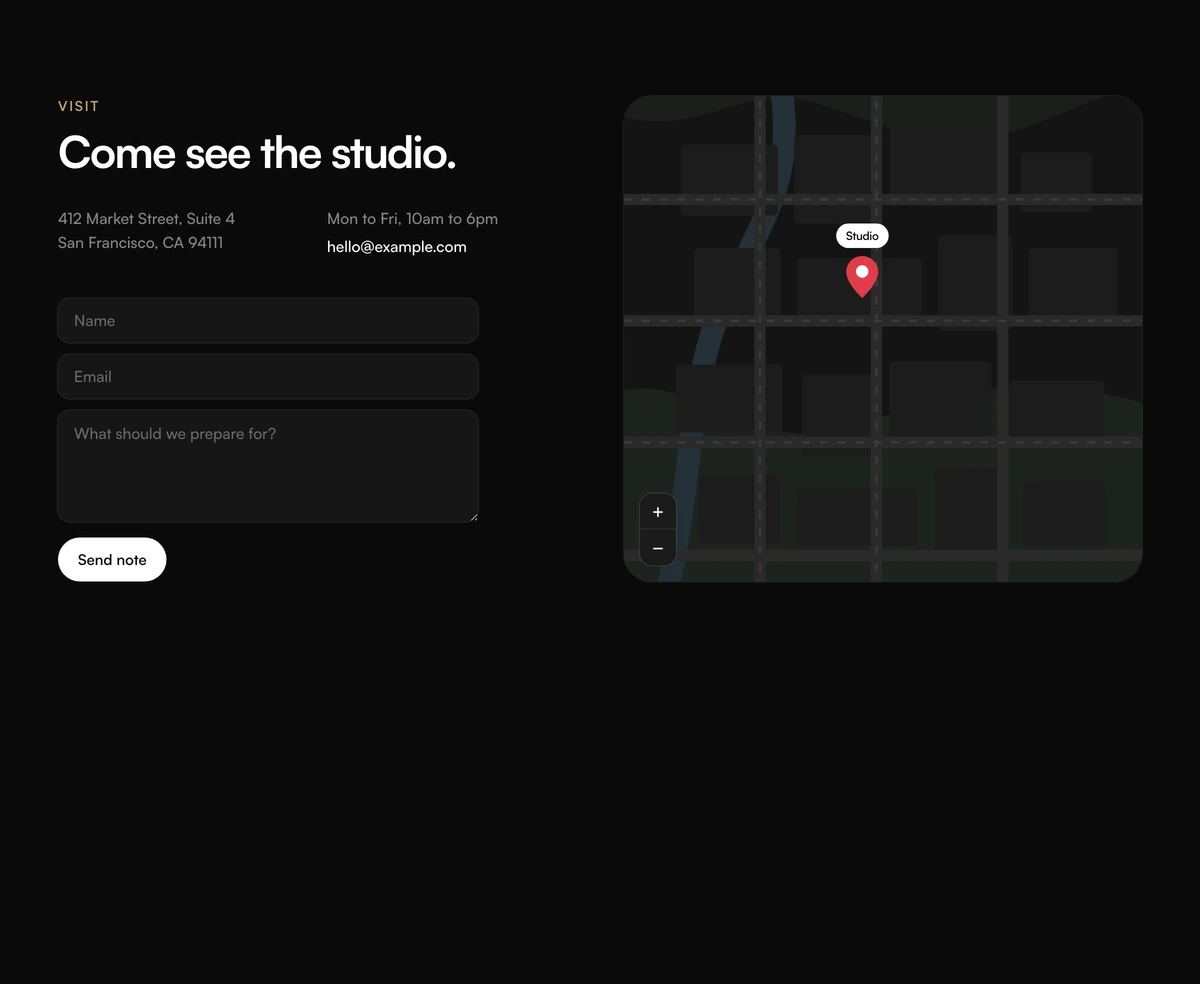
ProA contact section for somewhere people can visit. On the left: a Visit eyebrow, a heading, your address over two lines, opening hours, an email link and a short form. On the right: a hand drawn street map with a park, a river and city blocks, and a red pin labelled with your studio's name.
A map without a map provider
Contact Section with Map Preview is a React and Tailwind CSS contact section that pairs an address, hours and a contact form with a drawn SVG map illustration and a location pin. It runs in Next.js or any React app, needs no map API key, and follows light and dark themes.
Embedded maps are heavy: they load scripts, tiles and cookies from a third party before anyone interacts with them. For a studio, shop or office, a stylised map that shows the idea of a place, with the pin and the address in text, is often enough, and a directions link can send people to their own map app for the route.
Be clear about what it is. The map is an illustration; its streets are not your streets, and the zoom controls are decoration. If visitors need to find an exact entrance, link to a real map.
What is on each side
Location details
Eyebrow, h2, address with preserved line breaks, hours and an email link.
Short form
Name, email and message fields with labels hidden visually, and a submit button.
Drawn map
An SVG of a park, a river, blocks, streets and dashed paths, coloured for light and dark mode.
Pin
A red pin with a label, set by pinLabel.
Zoom marks
Plus and minus marks in the corner, styled like map controls but drawn as plain spans with no behaviour.
When an illustrated map is enough
Use it when
- Privacy conscious sites in Europe that would otherwise need consent before loading an embedded map.
- Studios, galleries, shops and offices that welcome visitors.
- You want a contact section with no third party scripts or cookies.
- The address and hours matter more than turn by turn directions.
- A visual that matches your site in both themes.
Skip it when
- Visitors need an accurate interactive map; embed a real one instead.
- You have several locations.
- Your business is online only.
- You expect the form to send email without a handler.
Address, pin and the form
Set eyebrow, headline, address with a newline between lines, hours, email and emailHref, and pinLabel for the name on the pin. Add a directions link next to the address yourself, pointing at your location in a maps app, since the illustration cannot give directions.
onSubmit gets the event after preventDefault; the fields are named name, email and message. Post them with FormData and show your own confirmation. To make the map feel closer to your area, you can edit the SVG paths in the component, for example moving the river or the park.
npx wensity@latest add contact-section-with-map-preview --type block
"use client";import { MapPreviewContact } from "@/components/wensity/blocks/contact-section-with-map-preview";export function Visit() {return (<MapPreviewContacteyebrow="Visit"headline="Drop by the workshop."address={"21 Rue des Martyrs\n75009 Paris"}hours="Tue to Sat, 11am to 7pm"email="atelier@example.com"emailHref="mailto:atelier@example.com"pinLabel="Atelier"onSubmit={(event) => {void fetch("/api/contact", { method: "POST", body: new FormData(event.currentTarget) });}}/>);}
Props
| Prop | Type | Default | Description |
|---|---|---|---|
address | string | - | Your address. A newline starts a new line. |
hours | string | "Mon to Fri, 10am to 6pm" | Opening hours under the address. |
email / emailHref | string | - | Text and link for the email line. |
pinLabel | string | "Studio" | Name shown on the map pin. |
onSubmit | (event: FormEvent<HTMLFormElement>) => void | - | Your send logic for the short form. |
submitLabel | string | "Send note" | Button text. |
What to know before shipping
Layout
Details and form on the left, map on the right from 1024px, inside a container up to 1180px wide. On smaller screens the map stacks below at a minimum height of 360px.
Theme aware map
Every map colour has a dark counterpart, so the park, river and blocks turn to muted greens and greys at night.
Illustration, not a map
There is no geocoding, embed or API. The streets are generic, so pair the pin with a real directions link.
Decorative controls
The plus and minus zoom marks are plain spans, so nobody can focus them, but sighted visitors may still try to click. Remove them if that confusion matters to you.
No third party requests
Everything is inline SVG and Tailwind classes, so the section adds no scripts, tiles or cookies.
Form gaps
Labels are hidden visually and there is no validation or success state. Add required attributes and a confirmation.
Block details
- Category
- Contact Sections
- Renders
- CSS only. Paints as soon as the stylesheet arrives
- Theme
- Follows the site theme in light and dark
- Dependencies
clsxtailwind-merge- Source
- 218 lines, 9 KB in one file
- Install
wensity add contact-section-with-map-preview --type block- Tags
- light, dark, contact, map, form, studio
- Last updated