React FAQ Section with Chat Style Answers on a Dashed Grid
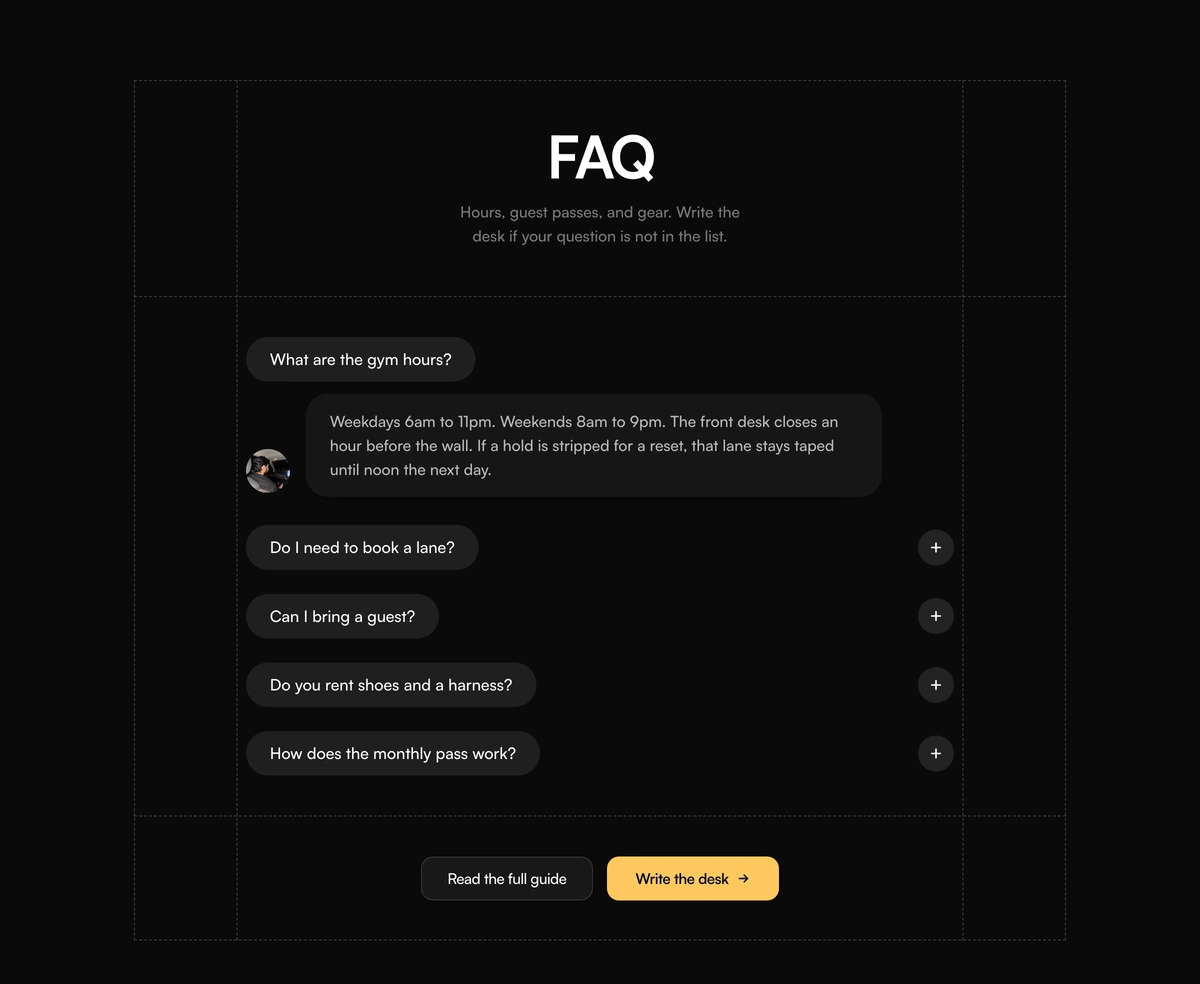
ProThis FAQ reads like a short conversation. Each question is a dark pill, each answer appears as a white chat bubble next to a small portrait, and the whole thing sits inside a dashed blueprint frame with two buttons at the bottom.
An FAQ that answers like a person would
FAQ Section with Dashed Grid Pills is a React FAQ section designed as a chat: questions are charcoal pill buttons, and opening one drops an answer bubble in beside an avatar. It is centred, narrow and quiet, with a dashed outer frame and two dashed vertical guides that make it look sketched on a grid.
The conversational format changes how answers are read. A short reply in a speech bubble feels like a staff member talking, which suits local businesses, studios and member services, where the questions are practical (opening hours, guests, rentals) and the tone should be friendly rather than corporate.
Below the questions, a dashed rule leads into two buttons: a white secondary such as "Read the full guide" and a warm yellow primary such as "Write the desk". The yellow is the only colour in the section, so the next step is impossible to miss.
How the chat style FAQ is put together
Dashed blueprint frame
A dashed outer border plus two dashed vertical lines inset about a tenth from each side, with dashed rules under the header and above the buttons.
Question pills
Each question is a rounded charcoal pill button. While a row is closed, a separate round plus button sits at its right edge as a second way to open it.
Answer bubble
The answer appears in a white rounded bubble with a soft shadow, aligned to the bottom of a 40 to 44px avatar, capped at about 36rem wide.
Two closing buttons
A white outlined secondary and a yellow primary with an arrow, centred and wrapping on narrow screens.
When a conversational FAQ suits the page
Use it when
- The audience is local or member based: a gym, a studio, a clinic, a co working space.
- Answers are short and practical, two or three sentences each.
- A real person behind the desk is part of what you are selling.
- You want the FAQ to end on one clear action, such as writing in.
Skip it when
- Answers are long or technical. Chat bubbles stop being readable past a short paragraph.
- You cannot put one real staff portrait beside every answer.
- Your design system avoids dashed or sketch style details.
- You need the FAQ to run wide alongside other content, since it is centred and capped at 980px.
Set the voice, the avatar and the two buttons
The questions are an items array, the avatar comes from avatarSrc and avatarAlt, and the two buttons each have a label and an href. The defaults describe a climbing gym and use a placeholder portrait with the alt text "Parth", so change both the photo and the alt to the person who actually answers.
Write the answers the way that person would say them out loud. The bubble format exposes stiff copy quickly, and it rewards the plain, specific answers that also tend to be the most useful.
npx wensity@latest add faq-section-with-dashed-grid-pills --type block
import { DashedGridPillsFaq } from "@/components/wensity/blocks/faq-section-with-dashed-grid-pills";export function StudioFaq() {return (<DashedGridPillsFaqheadline="Studio FAQ"description="Booking, parking and what to bring."avatarSrc="/team/sam.webp"avatarAlt="Sam, front desk"items={[{ id: "parking", question: "Is there parking?", answer: "Yes, six spaces behind the building, free after 6pm." },{ id: "mats", question: "Do I need my own mat?", answer: "No. We clean and lend mats for every class." },]}primaryLabel="Message Sam"primaryHref="/contact"secondaryLabel="Full studio guide"secondaryHref="/guide"/>);}
Props
| Prop | Type | Default | Description |
|---|---|---|---|
headline | string | "FAQ" | The large centred heading at the top of the frame. |
description | string | - | A short line under the heading, capped at about 28 characters per line. |
items | { id; question; answer }[] | 5 gym questions | The questions shown as pills and answers shown as bubbles. |
avatarSrc / avatarAlt | string | sample photo, "Parth" | The portrait beside every answer. Use the real person's name as alt text. |
secondaryLabel / secondaryHref | string | "Read the full guide" | The white button, for a longer help page. |
primaryLabel / primaryHref | string | "Write the desk" | The yellow button with an arrow, for the main next step. |
defaultOpenId | string | first item | Which question starts open with its bubble showing. |
Keyboard, motion and markup details
Two buttons on closed rows
A closed row offers both the question pill and a plus button, labelled "Open" plus the question, so keyboard users meet two tab stops for the same action. Remove the plus button if you want one.
Answer markup
Only the open question's bubble exists in the DOM. Closed answers are not rendered until opened, so they are invisible to crawlers until someone clicks.
Reduced motion
The bubble's slide down is replaced with an instant change when reduced motion is on.
Portrait loads with the answer
The avatar image renders inside each open bubble, so it is only requested when a row is open.
Block details
- Category
- FAQ Sections
- Renders
- JavaScript animation. Paints first, then animates
- Theme
- Follows the site theme in light and dark
- Dependencies
clsxframer-motiontailwind-merge- Source
- 250 lines, 9 KB in one file
- Install
wensity add faq-section-with-dashed-grid-pills --type block- Tags
- light, dark, faq, accordion, pills, dashed, cta
- Last updated