React Flat Rate Pricing Section with an All Inclusive Price and Comparison
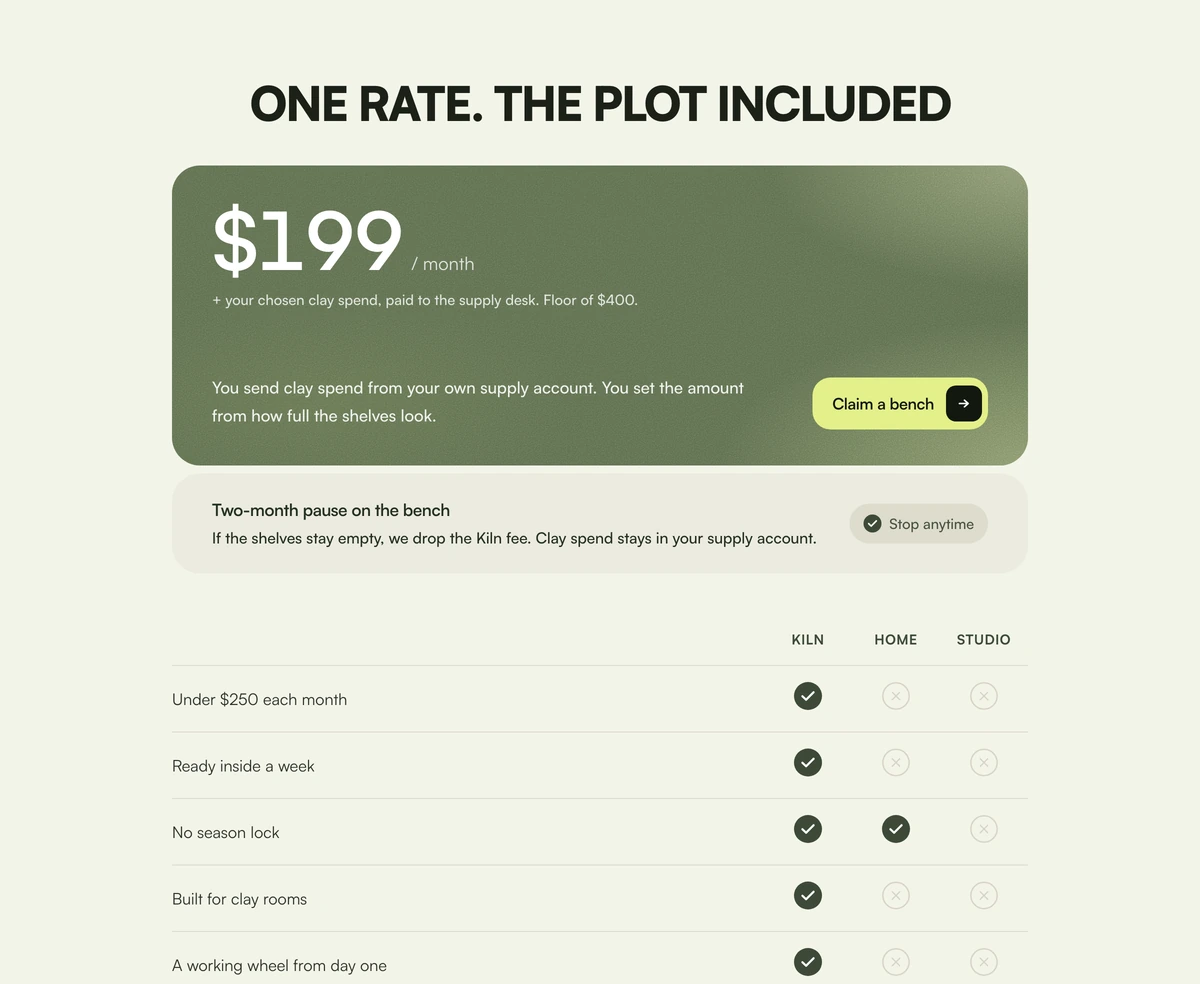
ProOne price, one card. A large figure with its period, a note about any extra spend, a short paragraph and a lime button sit on a grainy olive panel. Under it, a guarantee strip, and then a table showing what your price includes compared with two alternatives, with a check or a cross in every cell.
When there is only one plan
Pricing Section with Included Price is a React and Tailwind CSS pricing section for a single flat rate plan, pairing one all inclusive price card with a guarantee and a comparison table against the alternatives a buyer is weighing. It runs in Next.js or any React app and is drawn for light themes.
Agencies, studios and subscription services often have one price. Tier cards would be empty; a single price on its own feels exposed. The answer is to compare against what the buyer would otherwise do, such as hiring in house or using a cheaper competitor, and show what the price includes that those do not.
The panel uses radial glows and an SVG grain filter to give the olive and sage palette a tactile, printed quality, which suits services more than software.
From price to proof
Uppercase headline
A short, all caps line kept on one row, sized from 1.05rem to 2.85rem with the viewport.
Price card
The price and period in large type, a budget note, a paragraph and a lime button with an arrow tile, on a grainy panel with soft glows.
Guarantee strip
A title, a sentence and a small pill such as Stop anytime.
Comparison table
Your offer and two alternatives as columns, rows of what is included, with yes and no icons labelled Included and Not included for screen readers, and row headers scoped correctly.
Single price, honest comparison
Use it when
- Productised services, retainers and memberships with one price.
- You can name the two alternatives buyers usually consider.
- You offer a pause, cancellation or guarantee worth stating plainly.
- Warm, natural brand palettes.
Skip it when
- You sell several tiers.
- Dark themed sites; the block sets a light colour scheme.
- Your headline is long. It stays on one line and can overflow on phones.
- You would be tempted to misstate competitors in the table. Every cell must be accurate.
Price, guarantee and the table
Set headline, price, period, budgetNote, body and cta for the card, then guaranteeTitle, guaranteeBody and cancelLabel for the strip. columns lists your offer and the alternatives by id and label, and rows lists each inclusion with a cells object mapping column ids to yes or no.
Keep the headline to four or five short words. It is uppercase and does not wrap, so a longer line runs off narrow screens; if you need more words, remove the whitespace-nowrap class in the component.
Name the alternatives the way buyers do, such as a full time hire or a freelancer, rather than naming competitors. It keeps the table fair, avoids claims you would have to defend, and still shows why one flat price is the simpler choice.
npx wensity@latest add pricing-section-with-included-price --type block
import { IncludedPricePricing } from "@/components/wensity/blocks/pricing-section-with-included-price";export function Pricing() {return (<IncludedPricePricingheadline="ONE PRICE. DESIGN INCLUDED."price="$2,400"period="/ month"budgetNote="Fonts and stock images billed at cost."body="Unlimited design requests, one at a time, delivered in two working days."cta={{ label: "Book an intro call", href: "/call" }}guaranteeTitle="Pause any month"guaranteeBody="Hold your subscription when the queue is empty and pick up where you left off."cancelLabel="Cancel anytime"columns={[{ id: "us", label: "Studio plan" },{ id: "hire", label: "Full time hire" },{ id: "freelance", label: "Freelancers" },]}rows={[{ label: "Senior designer", cells: { us: "yes", hire: "yes", freelance: "no" } },{ label: "No recruiting time", cells: { us: "yes", hire: "no", freelance: "yes" } },]}/>);}
Props
| Prop | Type | Default | Description |
|---|---|---|---|
price / period | string | "$199" / "/ month" | The figure and its unit, shown large on the card. |
budgetNote | string | - | Small line for any spend outside the fee, such as materials or ad budget. |
columns | { id: string; label: string }[] | - | Your offer first, then the alternatives. |
rows | { label: string; cells: Record<columnId, "yes" | "no"> }[] | - | What is included, marked per column. |
guaranteeTitle / guaranteeBody / cancelLabel | string | - | The reassurance strip under the card. |
headline | string | - | Short uppercase line above the card. It never wraps. |
Facts and fixes
Headline overflow
whitespace-nowrap plus viewport based sizing means long headlines overflow on small screens.
Accessible comparison
The table uses scoped row headers and labelled icons, so each yes or no is announced in context.
Phone scroll
The table has a 640px minimum width and scrolls sideways on narrow screens.
No runtime
No state or animation. The grain is an inline SVG filter with a unique id per instance.
Light by design
The block sets a light colour scheme and an olive and sage palette that does not switch with dark mode.
Container
Everything sits in a column up to 920px wide, so the price card and table align on large screens.
Block details
- Category
- Pricing Sections
- Renders
- CSS only. Paints as soon as the stylesheet arrives
- Theme
- Fixed light surface. No dark variant
- Dependencies
clsxtailwind-merge- Source
- 252 lines, 10 KB in one file
- Install
wensity add pricing-section-with-included-price --type block- Tags
- light, pricing, guarantee, comparison, saas
- Last updated