React Pricing Calculator with Usage Sliders and a Live Receipt
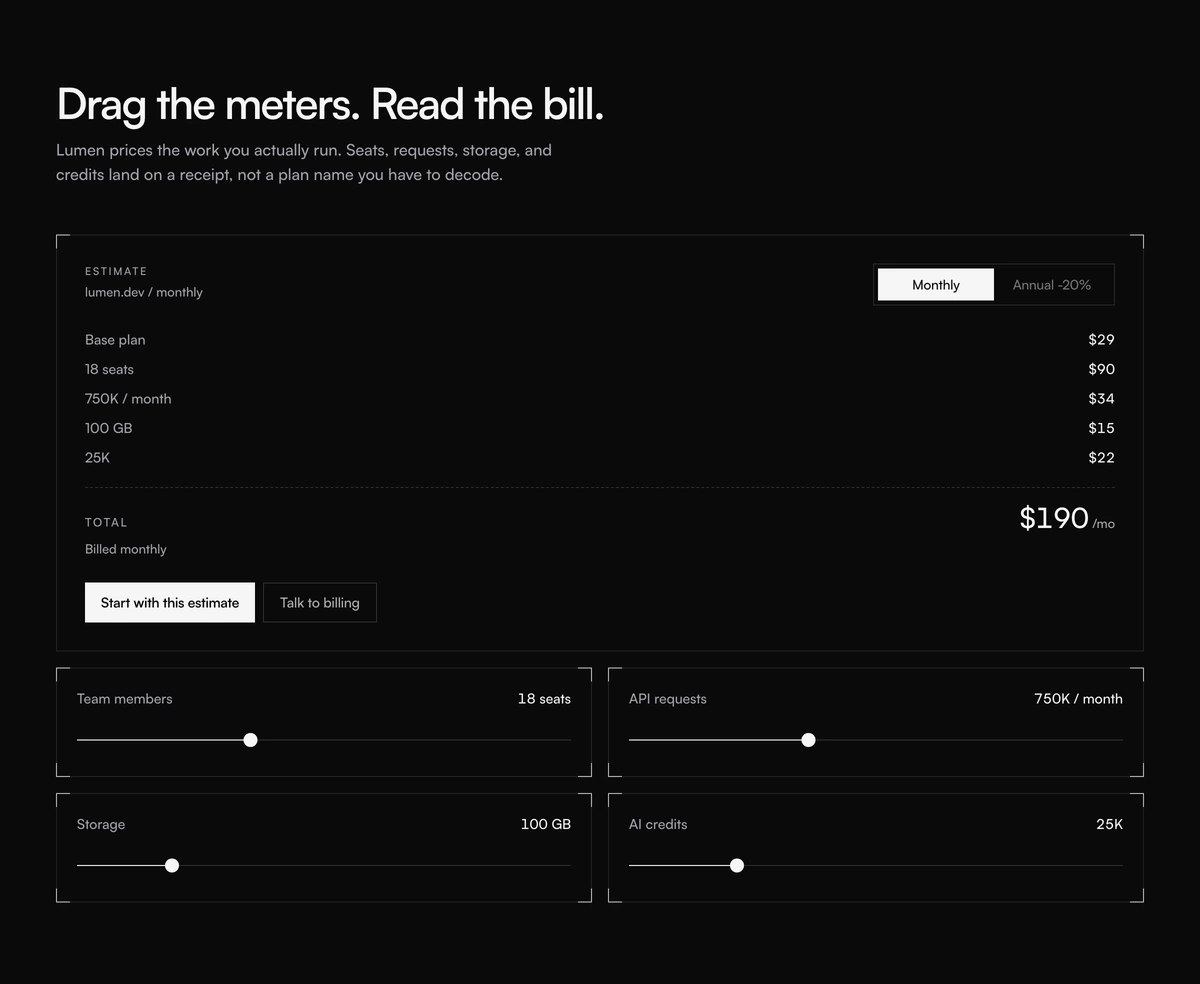
ProA working price estimator styled like a till receipt. Drag four sliders, team members, API requests, storage and AI credits, and a monospaced receipt beside them adds up the base plan and each meter line by line into a monthly total. Switch to annual billing and the receipt shows the discounted figure and the yearly charge.
Let buyers price their own usage
Pricing Section with Usage Receipt is a React and Tailwind CSS pricing calculator for usage based pricing: range sliders for each billable meter drive a live, itemised receipt with a monthly total and an annual option. It works in Next.js or any React app and follows your theme tokens in light and dark.
Usage based pricing is fair but hard to read. A table of per unit rates asks the buyer to do arithmetic; a calculator does it for them. Showing the result as a receipt, one line per meter, also explains where the money goes, which answers the next question before it is asked.
This is the only interactive pricing block in the set. The sliders are native range inputs with labels, the total is announced politely to screen readers as it changes, and the billing switch is a proper radio group.
Parts of the calculator
Four meters
Team members from 1 to 50 at $5 each, API requests from 50 thousand to 2 million, storage from 10 to 500 GB and AI credits from 5 thousand to 100 thousand, each with its own price curve.
Live receipt
An aside with aria-live polite listing the base plan, one line per meter, a dashed rule and the total per month, plus the annual charge when annual billing is on.
Billing switch
Monthly and Annual as a radiogroup with aria-checked. A pill slides between them with a shared layout animation, which is turned off for reduced motion. The annual label shows the discount.
Receipt styling
Monospaced figures, square corners and corner bracket frames, coloured with theme tokens such as foreground and muted foreground so it matches your palette.
Two calls to action
A primary that carries the estimate into sign up, and a secondary for talking to billing.
Should you show a calculator
Use it when
- You bill on usage, seats plus meters, and buyers ask what they would pay.
- Your pricing has four or fewer dimensions that can be expressed as sliders.
- You want the price to feel transparent rather than hidden behind a sales call.
- Developer and AI infrastructure products where usage varies widely by customer.
Skip it when
- You sell fixed tiers. A card or table layout is clearer.
- Your meters differ from the four built in and you cannot edit the file, as explained below.
- Pricing is negotiated per customer; an estimate here would set the wrong anchor.
- Your rates change often and the calculator would drift out of date.
Edit the meters in the file
The meters are a constant called DEFAULT_METERS inside the component, not a prop. Each meter has a label, a min, a max, a step, a default and a cost function that turns the slider value into dollars. Change those to match your billing: rename AI credits to minutes, change the storage curve, or remove a meter entirely.
From props you control the headline, subtext, basePlan (the fixed monthly fee, 29 by default), annualDiscount (0.2 for 20 percent) and the two buttons. Pass the estimate along with the primary button by appending the slider values to its href if your sign up flow can use them.
npx wensity@latest add pricing-section-with-usage-receipt --type block
import { UsageReceiptPricing } from "@/components/wensity/blocks/pricing-section-with-usage-receipt";export function Pricing() {return (<UsageReceiptPricingheadline="Pay for what your agents run"subtext="A small platform fee plus metered usage. Move the sliders to estimate your month."basePlan={19}annualDiscount={0.15}primaryCta={{ label: "Start with this estimate", href: "/signup" }}secondaryCta={{ label: "Talk to sales", href: "/contact" }}/>);}
Props
| Prop | Type | Default | Description |
|---|---|---|---|
basePlan | number | 29 | Fixed monthly platform fee shown as the first receipt line. |
annualDiscount | number | 0.2 | Fraction taken off when annual billing is selected. 0.2 shows as minus 20 percent. |
headline | string | "Drag the meters. Read the bill." | The section heading. |
subtext | string | - | One or two sentences on why you price by usage. |
primaryCta / secondaryCta | { label: string; href: string } | - | Start with the estimate, or contact billing. |
Accessibility and correctness
Labelled native sliders
Range inputs work with arrow keys and screen readers by default, and each has a visible label.
Announced totals
The receipt is a polite live region, so changes are read after the user stops moving a slider rather than interrupting.
Reduced motion
The sliding billing pill skips its shared layout animation for visitors who prefer reduced motion.
Estimate, not invoice
Label the total as an estimate in your copy and keep the cost functions in sync with your billing system, or the receipt will promise numbers you do not charge.
Theme aware
Colours come from your theme tokens, so it inherits light and dark without extra classes.
Block details
- Category
- Pricing Sections
- Renders
- JavaScript animation. Paints first, then animates
- Theme
- Follows the site theme in light and dark
- Dependencies
clsxframer-motiontailwind-merge- Source
- 351 lines, 11 KB in one file
- Install
wensity add pricing-section-with-usage-receipt --type block- Tags
- light, dark, pricing, usage, sliders, receipt, saas
- Last updated