React Customer Stories Section with Testimonial Tabs
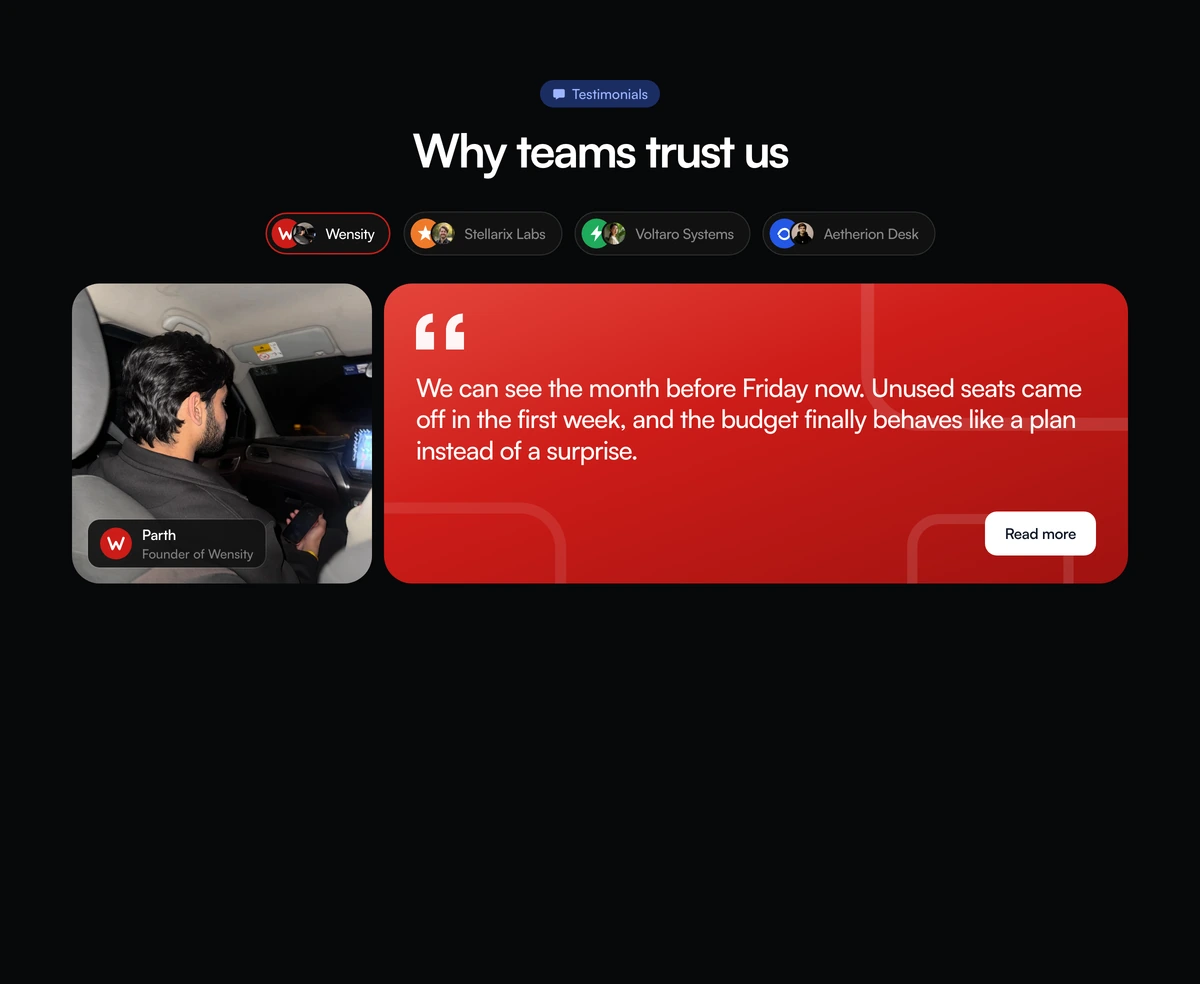
ProA row of company tabs, each with a logo mark and a small face. Choose one and the panel below shows that customer's portrait with their name and role, beside a large quote on a gradient in the company's colours, with a link to read the full story.
Several case studies in the space of one
Social Proof Section with Company Story Tabs is a React and Tailwind CSS testimonials section that organises customer stories into keyboard accessible tabs, one per company, with a portrait and a branded quote panel for the selected story. It runs in Next.js or any React app with Framer Motion.
Case studies are persuasive but long, and a page can only feature one or two before visitors stop scrolling. Tabs let you offer four companies in the height of one, and let each visitor pick the story closest to their own situation, often by recognising a peer or an industry.
The tabs follow the WAI ARIA tabs pattern properly, which is unusual for testimonial components: arrow keys move between companies, Home and End jump to the ends, and the panel is labelled by the active tab.
Tabs, portrait and quote
Tab list
A tablist named Customer stories. Each tab shows a brand mark, a small avatar and the company name, with aria-selected and aria-controls.
Active outline
The selected tab is outlined in its brand colour, moving between tabs with a shared layout animation that becomes an instant change under reduced motion.
Portrait card
A square photo of the person with a small card for their name and role.
Brand quote panel
A gradient picked for the company, a subtle square pattern, the quote in large type and a Read more link to the full story.
Directional slide
The panel slides in from the side that matches tab order, and only the active story is rendered.
Who should use story tabs
Use it when
- You have three or four customers with full case studies to link to.
- Your customers span industries and visitors should find their own.
- You have real portraits of the people quoted.
- Keyboard and screen reader support matters to your audience.
Skip it when
- You have short one line testimonials. Story tabs suit longer, attributed quotes.
- You want every quote visible at once for skimming.
- You need custom brand colours without editing the file, as the brand set is fixed.
- You have no portraits; the layout leans on the photo.
Map your customers to brands
stories takes an id, company, name, role, quote, avatar, portrait, brand and an optional href for the case study. brand must be one of four built in keys, which select the gradient and logo mark for that tab. To use your customers' real colours and marks, add entries to the brand map in the component: a gradient and a mark per brand.
ctaLabel sets the link text in each panel. Point every href at a page with the full story; a quote that leads nowhere wastes the click it earns.
npx wensity@latest add social-proof-section-with-company-story-tabs --type block
import { CompanyStoryTabsSocialProof } from "@/components/wensity/blocks/social-proof-section-with-company-story-tabs";export function Stories() {return (<CompanyStoryTabsSocialProofheadline="How teams use Fieldnote"ctaLabel="Read the case study"stories={[{id: "harbor",company: "Harbor Health",name: "Dr. Maya Ortiz",role: "Chief of Nursing",quote: "Handover notes went from twenty minutes a shift to five.",avatar: "/people/maya-sm.jpg",portrait: "/people/maya.jpg",brand: "stellarix",href: "/customers/harbor-health",},]}/>);}
Props
| Prop | Type | Default | Description |
|---|---|---|---|
stories | { id; company; name; role; quote; avatar; portrait; brand; href? }[] | - | One entry per tab. brand picks a gradient and mark from the built in set. |
ctaLabel | string | "Read more" | The link text in the quote panel. |
eyebrow / headline | string | - | Copy above the tabs. |
Accessibility and motion
Layout on large screens
From 1024px the portrait takes a fixed 300px column and the quote panel stretches beside it at the same height, so long and short quotes keep the same frame.
Two colour schemes
The section switches from a pale blue tint to near black in dark mode, and the portrait frame from warm sand to a dark brown.
Correct tab pattern
Roving tabindex, arrow key navigation, Home and End, and a labelled tabpanel. It behaves as screen reader users expect.
Reduced motion
The outline glide and the panel slide are removed for visitors who prefer reduced motion.
Only one panel in the DOM
Inactive stories are not rendered, so their quotes are not in the page HTML until selected. If every quote should be crawlable, render all panels and hide the inactive ones.
Images
Each story loads an avatar and a portrait. Size portraits for the square frame they fill.
Block details
- Category
- Social Proof Sections
- Renders
- JavaScript animation. Paints first, then animates
- Theme
- Follows the site theme in light and dark
- Dependencies
clsxframer-motiontailwind-merge- Source
- 398 lines, 14 KB in one file
- Install
wensity add social-proof-section-with-company-story-tabs --type block- Tags
- light, dark, testimonials, tabs, quotes, saas
- Last updated