React Contact Section with Sales, Support and Community Links
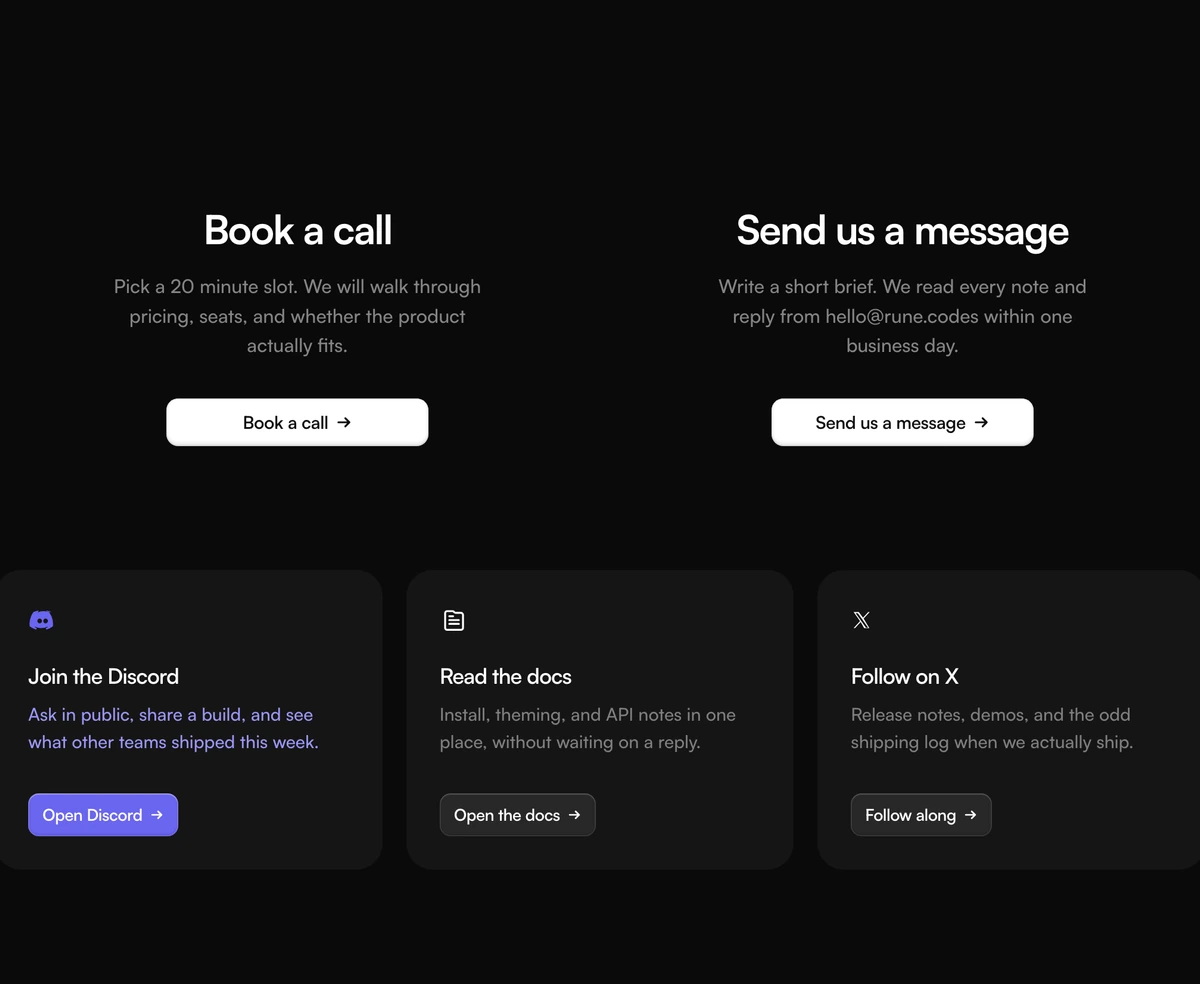
ProA contact section that points people to the right place instead of collecting a message. Two columns at the top offer a call with sales and an email to support, each with its own button. Three cards underneath link to sales, the docs and your community, with one card picked out in a bold purple.
Route people instead of asking them to write
Contact Section with Split Support Grid is a React and Tailwind CSS contact section that lists your support and sales channels as clear choices, a call, an email, documentation and community, with no form at all. It works in Next.js or any React app, in light and dark.
For many products a form is the slowest way to help. A buyer wants to book a call now, a user wants an answer that already exists in the docs, and a developer wants to ask other developers. Laying out those paths side by side gets each person to the right place in one click and keeps your inbox for the questions only you can answer.
Because there is no form, there is nothing to wire up: every action is a link you control, so the section works the moment it is installed.
Channels and cards
Two channel columns
Each with an h2, a description and a button. Sales links to a booking page; support uses a mailto link by default.
Three link cards
Cards with an icon, an h3, a description and a link label, for sales, docs and community.
Icon set
Card icons come from a fixed set: a chat community mark, a docs page and an X mark.
Accent card
One card can be accented in purple, #6a65f0 by default, to highlight where most people should go.
Grid
Channels sit in two columns on large screens; cards run one, two or three across depending on width.
Who should skip the form
Use it when
- You want fewer contact emails by sending how to questions to your docs first.
- Developer tools with good docs and an active community.
- Sales happens on calls booked through a scheduling link.
- You want a contact section that needs no backend.
- Support is handled by email or a help desk inbox.
Skip it when
- You need to collect structured enquiries; use one of the form blocks.
- You have no community space or docs to link.
- Your community lives somewhere other than the three built in icons represent and you cannot add an icon.
- A support form is the term your users search for; this section has none.
Set the channels and cards
sales and support each take a heading, description, href and label. Point sales at your scheduling page and support at a monitored address or your help desk. cards takes an id, heading, description, href, label, icon and optional accent; icon must be one of discord, docs or x, which are drawn in the file, so add your own icons there for other platforms.
Accent only one card. The purple fill is strong and works as a single pointer, not a pattern.
npx wensity@latest add contact-section-with-split-support-grid --type block
import { SplitSupportGridContact } from "@/components/wensity/blocks/contact-section-with-split-support-grid";export function Support() {return (<SplitSupportGridContactsales={{ heading: "Talk to sales", description: "A 20 minute call to see if we fit.", href: "/book", label: "Book a call" }}support={{ heading: "Get support", description: "We answer within one working day.", href: "mailto:help@example.com", label: "Email support" }}cards={[{ id: "docs", heading: "Documentation", description: "Guides and API reference.", href: "/docs", label: "Read the docs", icon: "docs" },{ id: "chat", heading: "Community", description: "Ask other builders.", href: "https://community.example.com", label: "Join the chat", icon: "discord", accent: true },]}/>);}
Props
| Prop | Type | Default | Description |
|---|---|---|---|
sales | { heading; description; href; label } | - | Left channel, usually booking a call. |
support | { heading; description; href; label } | - | Right channel, usually an email or help desk link. |
cards | { id; heading; description; href; label; icon: "discord" | "docs" | "x"; accent? }[] | - | Link cards under the channels. accent fills one in purple. |
Implementation notes
Width
Everything sits in a container up to 1080px wide, and channel descriptions are capped at about 340px so each column reads as one short paragraph.
Works with no setup
Because every action is a link, the section is useful the moment it is installed, with no API route or email service to configure.
Links only
No state, no form and no handlers. The client directive can be removed to render it on the server.
Heading levels
Channels use h2 and cards use h3. If the section sits under its own section title, consider lowering the channel headings.
Brand icons
The default card icons are platform marks. Use them only for real accounts on those platforms.
Themes
Cards and columns switch between light greys and near black with the theme.
Block details
- Category
- Contact Sections
- Renders
- CSS only. Paints as soon as the stylesheet arrives
- Theme
- Follows the site theme in light and dark
- Dependencies
clsxtailwind-merge- Source
- 230 lines, 8 KB in one file
- Install
wensity add contact-section-with-split-support-grid --type block- Tags
- light, dark, contact, support, cards
- Last updated