React FAQ Section over a Blurred Photo with a Consultation Card
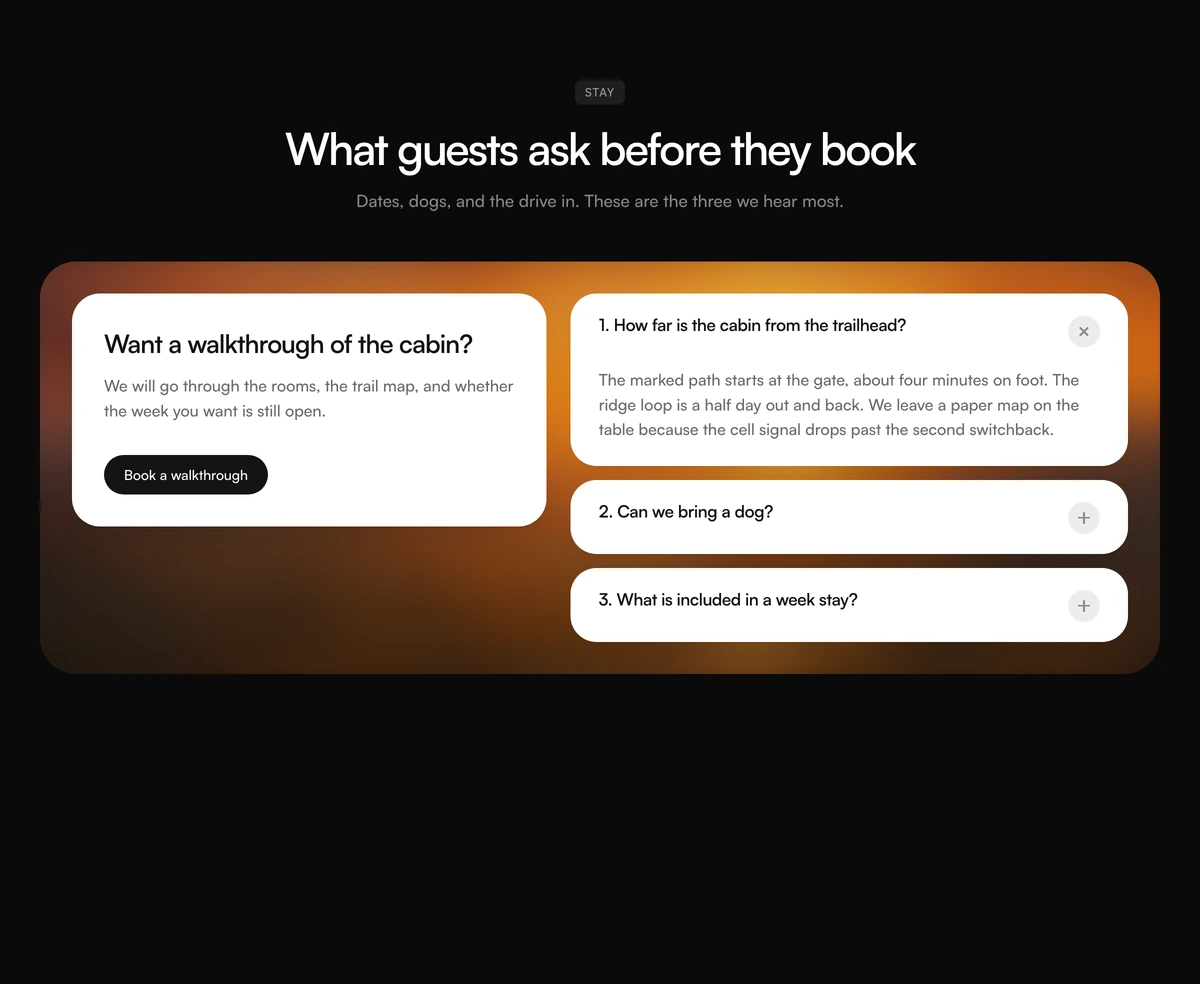
ProA badge, a centred heading and then a wide panel: a landscape photo blurred into colour, with a white consultation card and a short stack of numbered questions floating on top of it.
A FAQ that sells the place, not only the answers
FAQ Section with Photo Consult Panel is a React FAQ section that sets its questions on top of a heavily blurred photograph. The image is scaled up and blurred by 28px so it becomes a wash of colour and light rather than a picture, and the white cards on top stay crisp and readable.
That background is the point. A cabin, a clinic interior, a hotel view or a studio space keeps its mood even when blurred, so the FAQ quietly reminds the visitor what they are booking. It is built for hospitality, travel and in person services, where the decision is emotional and the questions are practical.
On the left of the panel, a consultation card asks for a walkthrough or a call. On the right, three numbered question cards answer the most common objections. Three is a deliberate default: this is a shortlist, not a help centre.
What sits inside the photo panel
Blurred photo backdrop
Any image, scaled to 118 percent and blurred 28px, with a 10 percent black overlay, inside a panel with 36px rounded corners.
Consultation card
A white card with an h3 title, a sentence of body copy and a dark pill button, for a walkthrough, tour or call.
Numbered question cards
White cards with 26px corners, each showing "1. Question" and a plus inside a grey circle that turns into a close mark.
Badge and centred header
A small uppercase badge above a centred h2 and description, outside the photo panel.
When the photo panel FAQ works best
Use it when
- You sell a place or an experience: a rental, a retreat, a venue, a treatment room.
- You have one strong photograph whose colours still read when blurred.
- There are only three to five questions that decide whether someone books.
- A guided walkthrough or call is the natural next step.
Skip it when
- Your FAQ is long. The panel is designed for a short list beside a single card.
- You need the cards to follow dark mode. They stay white on top of the photo in both themes.
- The page is already heavy with photography above and below.
- You have no photo with enough colour; a grey image blurs into mud.
Choose the photo, then write the shortlist
Pick the image first. Bold, warm or saturated photos survive the blur best; busy grey ones do not. Pass it as imageSrc, and give imageAlt only if the photo carries meaning for the reader. Left empty, the image is hidden from screen readers as decoration.
Then write the three questions people ask right before they book, each with a number, and set the consultation card's title, body, button label and link. The defaults describe a cabin stay with a trail map, firewood and a dog policy.
npx wensity@latest add faq-section-with-photo-consult-panel --type block
import { PhotoConsultPanelFaq } from "@/components/wensity/blocks/faq-section-with-photo-consult-panel";export function VenueFaq() {return (<PhotoConsultPanelFaqbadge="Venue"headline="Before you book the loft"imageSrc="/photos/loft-evening.webp"items={[{ id: "capacity", number: "1", question: "How many guests fit?", answer: "Eighty standing or forty five seated." },{ id: "catering", number: "2", question: "Can we bring our own caterer?", answer: "Yes, with proof of insurance a week before." },{ id: "late", number: "3", question: "How late can we stay?", answer: "Music stops at 11pm and the room clears by midnight." },]}cta={{ title: "See the loft in person", body: "Visits run on weekday afternoons.", buttonLabel: "Book a visit", href: "/visit" }}/>);}
Props
| Prop | Type | Default | Description |
|---|---|---|---|
badge | string | "Stay" | The small uppercase label above the heading. |
headline | string | "What guests ask before they book" | The centred h2. |
description | string | - | One line under the heading. |
imageSrc / imageAlt | string | river valley photo, empty alt | The photo that becomes the blurred backdrop. Empty alt marks it decorative. |
items | { id; number; question; answer }[] | 3 cabin questions | The shortlist of numbered questions. |
cta | { title; body; buttonLabel; href } | Book a walkthrough | The white consultation card on the left of the panel. |
defaultOpenId | string | first item | The question that starts open. |
Image cost, theming and accessibility
One full size image
The backdrop is a normal img element, loaded at full resolution even though it is blurred. A small, low quality version of the photo looks identical once blurred and saves bandwidth.
Cards stay white
The question and consultation cards are white with dark text in both themes, so contrast holds on any photo, and the section only changes its outer background in dark mode.
Two kinds of h3
The consultation card title and every question are h3 elements under the section's h2, which keeps the heading outline flat and readable.
Reduced motion and unmounting
Answers open instantly under reduced motion, and a closed answer is removed from the DOM rather than hidden.
Block details
- Category
- FAQ Sections
- Renders
- JavaScript animation. Paints first, then animates
- Theme
- Follows the site theme in light and dark
- Dependencies
clsxframer-motiontailwind-merge- Source
- 232 lines, 8 KB in one file
- Install
wensity add faq-section-with-photo-consult-panel --type block- Tags
- light, dark, faq, accordion, photo, cta
- Last updated