React File Upload Feature Section with a Dropzone Mockup
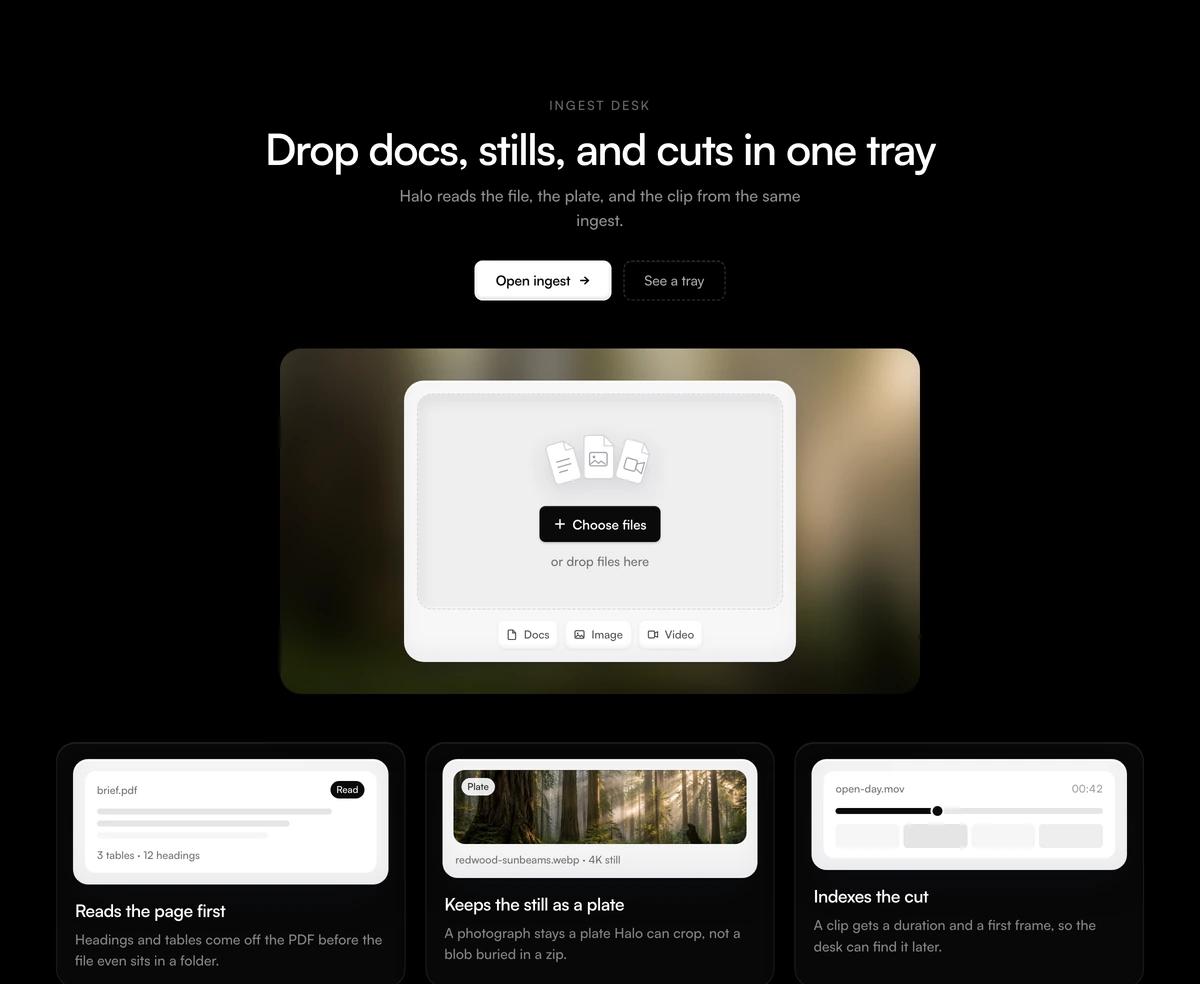
ProA centred section that sells an upload or ingest feature. An eyebrow, a headline and two buttons sit over a blurred forest photo holding a dropzone card with fanned file icons, a Choose files button and chips for docs, images and video. Three cards below show what happens to each kind of file.
A dropzone that explains, not one that uploads
Feature Section with Media Upload Stage is a React and Tailwind CSS feature section that markets a file upload capability with a dropzone UI mockup and three cards for documents, images and video. It is a marketing section for Next.js or any React app, not a working uploader.
On a landing page, visitors do not need to upload anything; they need to see that uploading is easy and what happens afterwards. The dropzone tells the first part at a glance, and the three cards tell the second: a document is parsed into headings and tables, a photo becomes a plate, a video gets a scrubber at a timecode.
If you need a real file input, wire one into the dropzone card yourself. The section below shows where, and the visual will work as a skin for it.
From header to cards
Centred header
An uppercase eyebrow, an h2, a sentence and two buttons, the second with a dashed border.
Blurred photo panel
A wide rounded panel with a blurred redwood photograph that sets the colour of the stage.
Dropzone card
Three fanned file icons, a Choose files button, a hint line and three chips. None of them are wired to anything.
Kind cards
Three cards with a title and body, each with a tiny built in mock picked by kind: page shows extracted lines and counts, plate shows a photo thumbnail, cut shows a video scrubber.
When to use it
Use it when
- Products that ingest files: document AI, asset management, media pipelines, transcription.
- You support documents, images and video and want to show all three.
- A marketing page where the upload is a promise, not an action.
- A centred layout suits the page rhythm around it.
Skip it when
- You need a working drag and drop file upload component. This one has no file input or drag events.
- You support only one kind of file; the three card layout is built around three.
- Uppercase eyebrows conflict with your style; removing this one cleanly means editing the file.
- Your product page needs a real screenshot of the uploader rather than a stylised one.
Adapt the copy, or make it real
For a marketing section, set eyebrow, headline, subtext, the buttons, buttonLabel and hint, then pass features with title, body and one of three kinds: page, plate or cut. Each kind draws its own small mock, so match the kind to the file type the card describes.
To turn the card into a working dropzone, add a hidden input with type file and multiple, open it from the Choose files button, and handle onDragOver and onDrop on the card element. Keep the visual and add a visible focus style on the button, since it will now be interactive.
npx wensity@latest add feature-section-with-media-upload-stage --type block
import { MediaUploadStage } from "@/components/wensity/blocks/feature-section-with-media-upload-stage";export function UploadFeature() {return (<MediaUploadStageeyebrow="Ingest"headline="Drop in contracts, scans and recordings"subtext="Docket reads every file you add and files it under the right matter."buttonLabel="Add files"hint="PDF, JPG, MP4 up to 2 GB"features={[{ title: "Contracts", body: "Clauses and parties extracted on arrival.", kind: "page" },{ title: "Scans", body: "Handwriting turned into searchable text.", kind: "plate" },{ title: "Recordings", body: "Calls transcribed with timestamps.", kind: "cut" },]}/>);}
Props
| Prop | Type | Default | Description |
|---|---|---|---|
features | { title: string; body: string; kind: "page" | "plate" | "cut" }[] | - | The three cards. kind chooses the built in mock: document lines, photo or video scrubber. |
eyebrow | string | "INGEST DESK" | Uppercase label above the headline. An empty string leaves an empty line in its place, so delete the paragraph in the file to remove it fully. |
buttonLabel | string | "Choose files" | Text on the dropzone button. |
hint | string | "or drop files here" | Line under the button. |
photoSrc / photoAlt | string | - | Image behind the dropzone, blurred in the panel. |
Honest limits
Not an uploader
There is no input, no click handler on the button and no drag and drop. Visitors who try to drop a file onto it in your marketing page will see nothing happen, so keep the hint wording promotional.
Static and light
No state or animation. Only the panel photo is requested.
Button semantics
The Choose files control is a button with no action. If you keep the block decorative, consider rendering it as a span so it does not take keyboard focus.
Dark mode
The section follows the theme, while the photo panel looks the same in both.
Block details
- Category
- Feature Sections
- Renders
- CSS only. Paints as soon as the stylesheet arrives
- Theme
- Follows the site theme in light and dark
- Dependencies
clsxtailwind-merge- Source
- 326 lines, 15 KB in one file
- Install
wensity add feature-section-with-media-upload-stage --type block- Tags
- light, dark, photograph, upload, docs, video, ai, saas
- Last updated