React AI Assistant Feature Section with a Composer Mockup
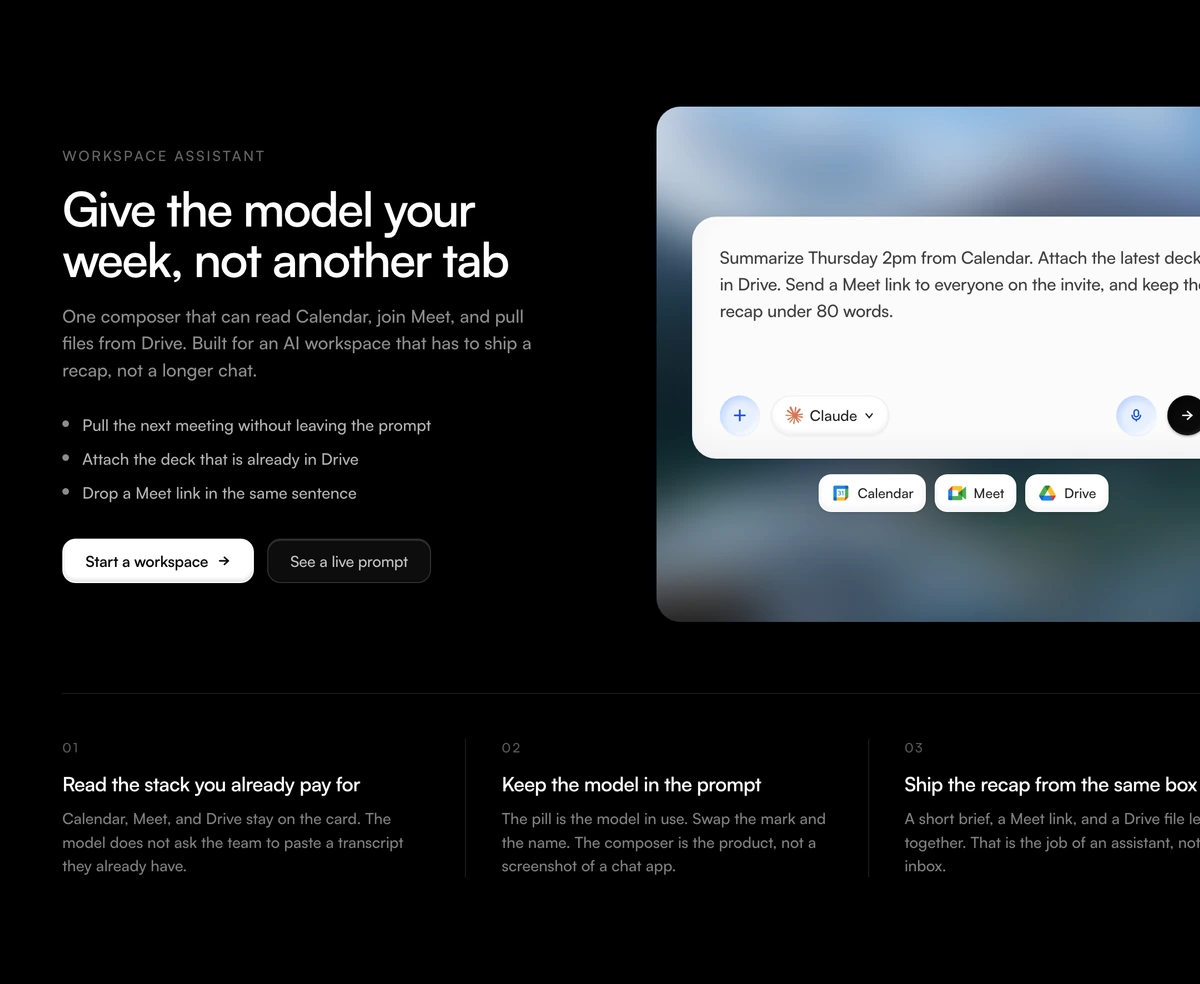
ProA section for an AI assistant that works across a team's tools. On the left, an eyebrow, a headline, a paragraph, three bullet points and two buttons. On the right, a chat composer sits on a softened mountain photo, holding a long realistic prompt, a model pill and chips for calendar, meetings and files. Three numbered claims run along the bottom.
Show the request, then the promise
Feature Section with Workspace Composer is a React and Tailwind CSS feature section for AI assistant products, built around a message composer mockup that shows a multi step request touching several tools. It is static markup for Next.js or any React app.
An AI assistant is easiest to understand through one ambitious request: summarise a meeting, attach a file and invite everyone, in a single sentence. The composer shows exactly that, and the chips under it name the tools involved, so the visitor sees both what they can ask and what the assistant can reach.
The composer has a tactile, almost physical look: buttons sit in soft inset wells, like keys pressed into the surface. Below the stage, three numbered claims with vertical dividers give the section a second, quicker read for people who skip the prompt.
What is in the composer section
Copy column
An eyebrow, an h2, a paragraph, a short list of points and two calls to action.
Composer mockup
A rounded card with the prompt as text, an attach button, a model pill, a microphone and a send button, all presentational, drawn with inset shadows.
Tool chips
Chips under the prompt, each with a label and one of three icons: calendar, meeting or file storage.
Photo stage
A landscape photo behind the composer, softened so the card stays the focus.
Numbered claims
Three columns below with an index, an h3 title and a short body, separated by thin vertical rules.
Who it fits
Use it when
- AI assistants and agents that act across calendar, meetings and documents.
- You can write one realistic request that shows off several abilities at once.
- You want a mockup with a crafted, tactile look rather than a flat screenshot.
- Three short claims summarise your value.
Skip it when
- You cannot edit the file, because third party marks are built in, as below.
- Your assistant does not connect to calendar, meeting or storage tools; the chip icons are limited to those three.
- You need the composer to accept input.
- Your section style avoids uppercase eyebrows, since this one has a fixed eyebrow.
Remove the borrowed marks first
Open the file before you ship. The model pill draws a real AI company's logo next to modelLabel, and the three chip icons are real product icons for a calendar, a meeting tool and a file store. The eyebrow, WORKSPACE ASSISTANT, is also written into the markup. Replace the logo with your own mark, redraw or swap the chip icons for neutral ones, and edit or remove the eyebrow.
Everything else is a prop. prompt holds the long request, chips takes a label and one of the three icon keys, claims takes an index, title and body, and points is a list of strings for the bullets.
npx wensity@latest add feature-section-with-workspace-composer --type block
import { WorkspaceComposerFeature } from "@/components/wensity/blocks/feature-section-with-workspace-composer";export function AssistantFeature() {return (<WorkspaceComposerFeatureheadline="One message, the whole handover"subtext="Brief writes the summary, files the notes and books the follow up."prompt="Summarise today's client call, save the notes to the project folder and book a 30 minute follow up next week."modelLabel="Brief"chips={[{ label: "Calendar", icon: "calendar" },{ label: "Files", icon: "drive" },]}points={["Works from one prompt", "Asks before it sends", "Keeps a log of every action"]}claims={[{ index: "01", title: "No new tab", body: "It runs where your team already writes." },{ index: "02", title: "Your rules", body: "Admins choose which tools it can touch." },{ index: "03", title: "Undo", body: "Every action can be reversed for a day." },]}/>);}
Props
| Prop | Type | Default | Description |
|---|---|---|---|
prompt | string | - | The request shown in the composer. One long, specific sentence works best. |
modelLabel | string | - | Text in the model pill. The logo beside it is hardcoded, so change both. |
chips | { label: string; icon: "calendar" | "meet" | "drive" }[] | - | Tool chips under the prompt. |
claims | { index: string; title: string; body: string }[] | - | Three numbered points across the bottom. |
points | string[] | - | Bullets in the copy column. |
photoSrc / photoAlt | string | - | Landscape image behind the composer. |
Facts to know before shipping
Third party logos
The model pill and the chip icons use real brands' marks. Shipping them suggests a partnership or integration you may not have.
Static
No state, effects or animation. It can render on the server once the client directive is removed.
Decorative controls
Composer buttons are presentational, so they are not focusable and do not mislead keyboard users.
One image
The stage photo is the only request. Serve it at the size of the stage, not full width.
Block details
- Category
- Feature Sections
- Renders
- CSS only. Paints as soon as the stylesheet arrives
- Theme
- Follows the site theme in light and dark
- Dependencies
clsxtailwind-merge- Source
- 335 lines, 18 KB in one file
- Install
wensity add feature-section-with-workspace-composer --type block- Tags
- light, dark, photograph, composer, ai, workspace, split, saas
- Last updated