React Vertical Zigzag Timeline for a Case Study or Project Process
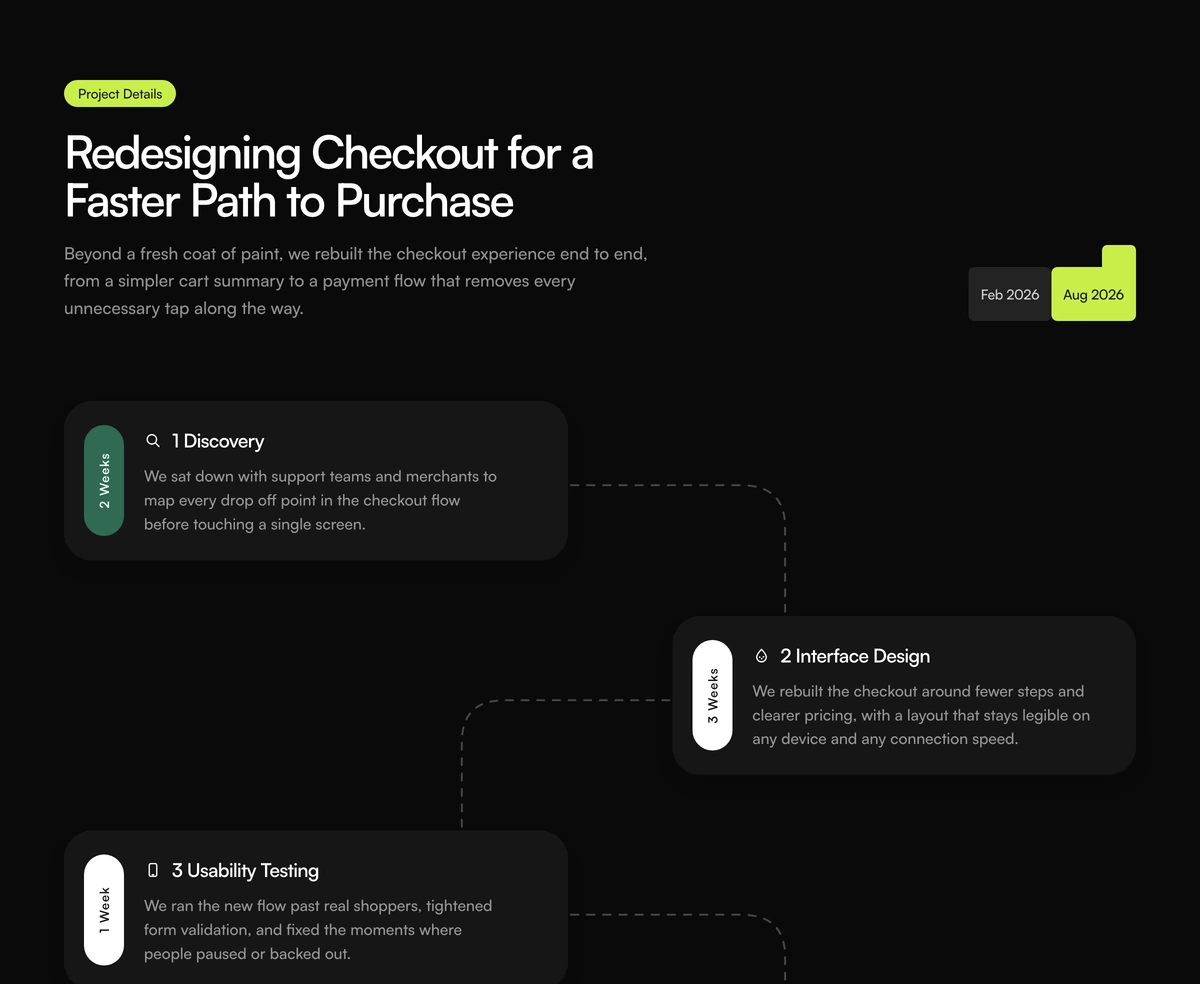
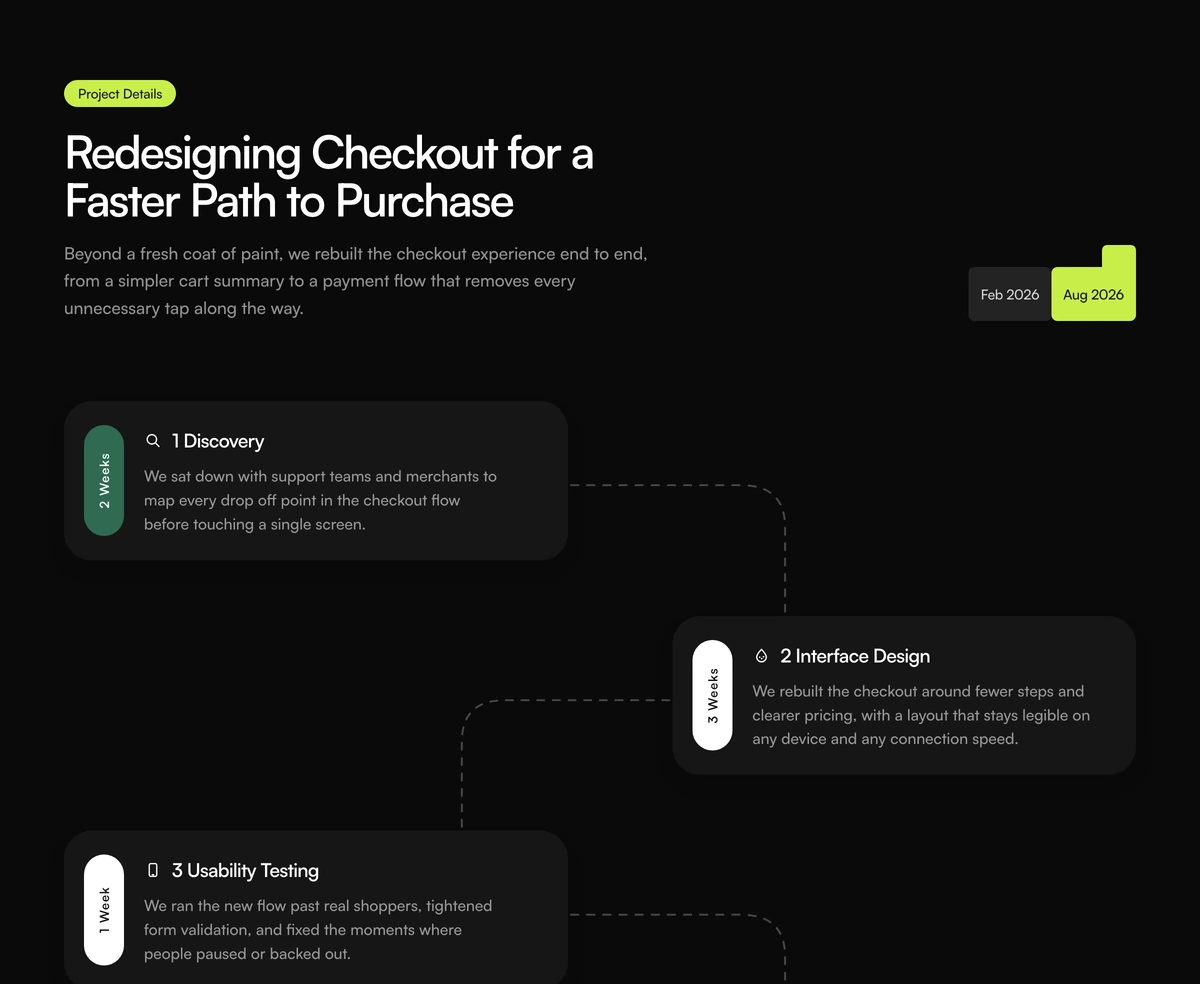
ProFour step cards that alternate left and right down the page, each with a vertical duration tab and an icon, joined by dashed elbow lines. A date range badge in the corner frames the whole thing as a real project with a start and an end.
A project timeline that reads like a case study
How It Works Section with Zigzag Timeline is a React vertical timeline component for showing a process as dated phases. Steps sit in two columns and step down one row at a time, so the eye zigzags from card to card along dashed connectors, and each card shows how long that phase took on a tab printed sideways.
Durations and a start and end date change what the section says. A generic three step process explains how a product works; this layout explains how a piece of work was done, which is why its defaults are a checkout redesign told as discovery, interface design, testing and rollout. It belongs on agency case studies, portfolio projects and service pages that sell a process.
It is a server component with no client JavaScript. The zigzag, the connectors and the sideways text are all CSS and inline SVG, so it renders fully in the first HTML response.
What each part of the zigzag timeline does
Two column zigzag
From the medium breakpoint, odd steps sit in the left column and even steps in the right, each on its own row. On phones they stack into a single column.
Dashed elbow connectors
An SVG line with a rounded corner runs from each card toward the next one, dashed 5 on 6, and the last card has none.
Sideways duration tab
A narrow pill on the left of every card prints the duration vertically, in forest green or ink, using writing mode rather than a rotated image.
Step icon and title
Four built in icons, research, design, prototype and delivery, sit beside an h3 title inside a soft rounded card.
Date range badge
A grey start date and a lime end date sit side by side in the header, with a small lime square raised above the end date.
When to show your process as a dated timeline
Use it when
- You are telling the story of one project: a case study, a client engagement, a redesign.
- Each phase has a real duration you are happy to publish.
- The process has four steps, which is the number the layout is built around.
- You want a how it works section that renders without any JavaScript.
Skip it when
- Your process has more than four steps. Rows are defined for four, so a fifth card lands on the fourth row beside it.
- The steps describe how to use a product, where durations would be meaningless.
- Lime does not fit your palette and you do not want to edit the colour constant.
Replace the steps, durations and dates
Pass steps as an array of id, duration, title, description, icon and tone. Titles in the defaults include the step number ("1 Discovery"), so keep or drop that pattern consistently. Icons are limited to the four built in names, and tone picks the forest or ink duration tab.
startDate and endDate fill the badge in the header, and eyebrow, heading and lede fill the text beside it. All of the defaults describe a fictional checkout redesign, so the whole section needs your own project.
npx wensity@latest add how-it-works-section-with-zigzag-timeline --type block
import { ZigzagProcessTimelineHowItWorks } from "@/components/wensity/blocks/how-it-works-section-with-zigzag-timeline";export default function CaseStudy() {return (<ZigzagProcessTimelineHowItWorkseyebrow="Case study"heading="Rebuilding onboarding for a payroll app"startDate="Q1 2026"endDate="Q2 2026"steps={[{ id: "audit", duration: "1 Week", title: "1 Audit", description: "Recorded twenty first sessions and mapped every drop off.", icon: "research", tone: "forest" },{ id: "flows", duration: "3 Weeks", title: "2 New flows", description: "Cut the signup from nine screens to four.", icon: "design", tone: "ink" },{ id: "test", duration: "2 Weeks", title: "3 Testing", description: "Ran the flow with new customers on real payroll data.", icon: "prototype", tone: "ink" },{ id: "ship", duration: "1 Week", title: "4 Launch", description: "Released to all accounts behind a staged rollout.", icon: "delivery", tone: "forest" },]}/>);}
Props
| Prop | Type | Default | Description |
|---|---|---|---|
eyebrow | string | "Project Details" | The lime pill above the heading. |
heading | string | - | The section h2, written as the project's headline. |
lede | string | - | A short paragraph that sets up the project. |
startDate / endDate | string | "Feb 2026" / "Aug 2026" | The two dates in the header badge. Any text works, such as a quarter. |
steps | { id; duration; title; description; icon; tone }[] | 4 checkout steps | Up to four phases. icon is research, design, prototype or delivery; tone is forest or ink. |
className | string | - | Classes on the section, for instance tighter padding when the timeline sits inside a case study layout. |
Rendering, structure and limits
Zero client JavaScript
There is no use client directive and no animation library. The block is plain markup and CSS, so it is ready in the server HTML.
A real ordered list
Steps render as an ol with list items, so screen readers announce how many steps there are and where each one falls.
Connectors hide on phones
Below the medium breakpoint the dashed lines are hidden and the cards stack, which keeps the mobile layout clean.
Four rows, by design
The row placement classes stop at four. Add a fifth row class in the source before passing more steps.
Block details
- Category
- How It Works Sections
- Renders
- CSS only. Paints as soon as the stylesheet arrives
- Theme
- Follows the site theme in light and dark
- Dependencies
clsxtailwind-merge- Source
- 270 lines, 9 KB in one file
- Install
wensity add how-it-works-section-with-zigzag-timeline --type block- Tags
- light, dark, how it works, process, timeline, zigzag, case study
- Last updated