React Sticky Scroll Section with Product Screenshots
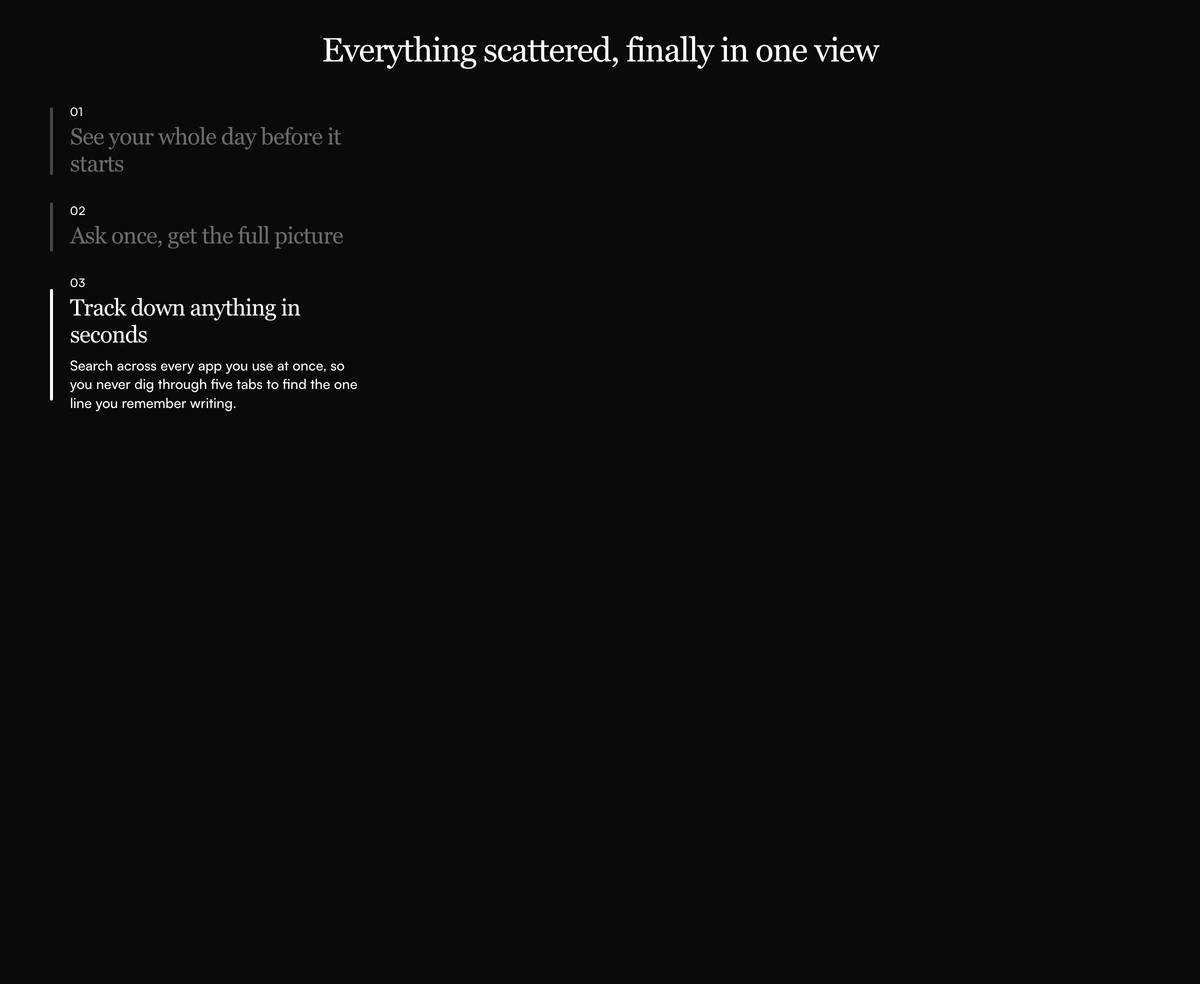
ProA sticky list of numbered steps on the left and large product images on the right. As the images scroll, the step whose image is in view lights up and opens its description, and clicking a step scrolls straight to its image.
Feature walkthrough that follows the reader's scroll
How It Works Section with Sticky Scroll Mockups is a React scroll spy section: step titles stay pinned in a sidebar while their screenshots scroll past, and the sidebar highlights whichever step matches the image in view. The active step shows a solid bar and its description; the rest fade to 40 percent.
This is the layout products like note apps and AI assistants use to walk through three or four capabilities, because it shows the real interface at full size while keeping the list of steps visible. It explains a product better than icons can, but only if you have screenshots worth showing.
One detail matters before you use it. The scrolling happens inside the section, in a box 520px tall, not on the page itself. That keeps the effect self contained and avoids hijacking the page scroll, but it means the section scrolls separately from everything around it.
How the sticky scroll works
Contained scroll area
A 520px tall box with its own vertical scroll and overscroll containment, so reaching the end does not scroll the page behind it.
Sticky step list
A nav landmark labelled "How it works steps" holds one button per step, sticking to the top of the scroll area.
Active step detection
On scroll and resize, the component measures which image is closest to a line 35 percent down the box and marks that step active.
Expanding description
The active step's body opens with a grid row transition from zero to full height, while inactive steps collapse but keep their text in the markup.
Click to jump
Clicking a step smoothly scrolls the box to that step's image, leaving 24px of space above it.
When a scroll spy walkthrough beats a grid
Use it when
- You have three or four strong, real product screenshots.
- Each step needs a sentence of explanation next to a large visual.
- The section should feel interactive without autoplay or animation libraries.
- Your page already scrolls normally around it, so a contained scroll area feels intentional.
Skip it when
- You only have icons or illustrations. Without real images the layout looks empty.
- Visitors are mostly on phones, where a scroll area inside a scrolling page is easy to miss.
- You need the steps to work as a static list for print or very simple pages.
Add your screenshots and step copy
Steps are an array of id, number, title, body, imageSrc and imageAlt. The defaults use landscape travel photos as stand ins, so the first job is to replace every image with an actual screenshot or product render, and to write alt text that describes what the screen shows.
To change the height of the scroll area, edit the h-[520px] class on the scroll container. Taller boxes show more of each image at once; shorter ones make the active step change more often.
npx wensity@latest add how-it-works-section-with-sticky-scroll-mockups --type block
import { StickyScrollMockupsHowItWorks } from "@/components/wensity/blocks/how-it-works-section-with-sticky-scroll-mockups";export function Walkthrough() {return (<StickyScrollMockupsHowItWorksheading="From inbox to done in one place"steps={[{ id: "capture", number: "01", title: "Capture anything", body: "Forward emails and links straight into your list.", imageSrc: "/shots/capture.webp", imageAlt: "Inbox view with three forwarded emails turned into tasks" },{ id: "plan", number: "02", title: "Plan the week", body: "Drag tasks onto days and see your load at a glance.", imageSrc: "/shots/plan.webp", imageAlt: "Weekly planner with tasks spread across five days" },{ id: "finish", number: "03", title: "Finish and review", body: "A Friday summary shows what moved and what slipped.", imageSrc: "/shots/review.webp", imageAlt: "Weekly review screen listing completed and overdue tasks" },]}/>);}
Props
| Prop | Type | Default | Description |
|---|---|---|---|
heading | string | "Everything scattered, finally in one view" | The centred serif h2 above the scroll area. |
steps | { id; number; title; body; imageSrc; imageAlt }[] | 3 sample steps | Each step's label, description and the image it is paired with. |
className | string | - | Classes on the section, such as removing its vertical padding when it sits between two full width images. |
Scroll behaviour and accessibility
Passive scroll listener
The active step updates from a passive scroll listener on the inner box and a resize listener on the window, both removed on unmount.
Descriptions stay indexable
Inactive step descriptions are collapsed visually but remain in the HTML, so every step's text is available to search engines from the first render.
Smooth scroll is not reduced
Clicking a step always scrolls smoothly; there is no reduced motion check. Switch behavior to auto when prefers-reduced-motion is set.
No active state for assistive tech
The highlighted step is shown visually only. Add aria-current to the active button so screen reader users know which step matches the image.
Images load eagerly
The step images are plain img elements without lazy loading. Add loading="lazy" to all but the first if the section sits below the fold.
Block details
- Category
- How It Works Sections
- Renders
- CSS only. Paints as soon as the stylesheet arrives
- Theme
- Follows the site theme in light and dark
- Dependencies
clsxtailwind-merge- Source
- 177 lines, 6 KB in one file
- Install
wensity add how-it-works-section-with-sticky-scroll-mockups --type block- Tags
- light, dark, how it works, sticky, scroll, mockup
- Last updated