React Credit Based Pricing Section with Plan Columns
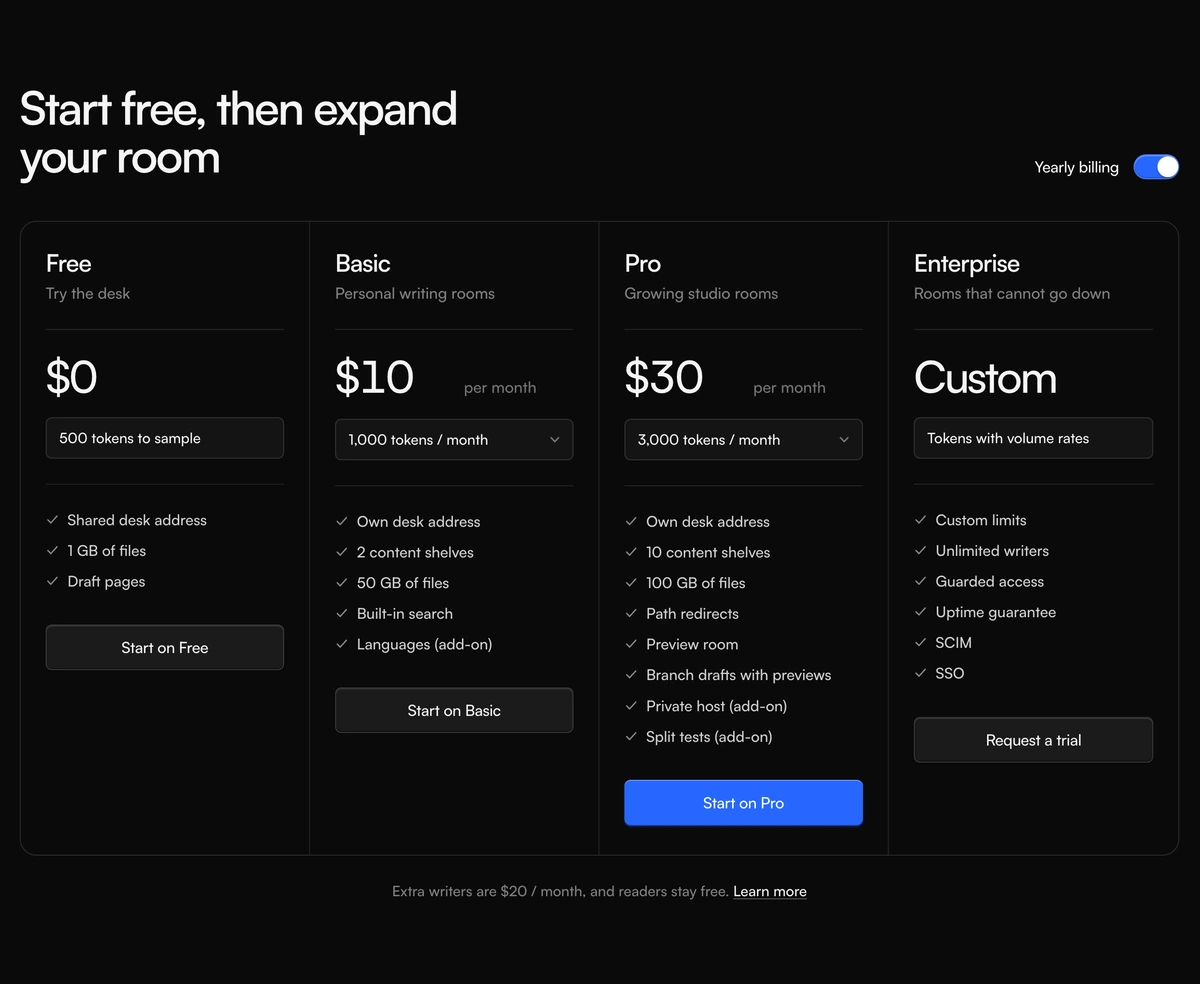
ProFour pricing tiers side by side in one bordered panel: Free, Basic, Pro and Enterprise. Each paid column has a small dropdown for how many credits you want each month, and choosing a bigger amount updates that column's price on the spot. A yearly switch lowers every price at once.
Tiers that scale inside each plan
Pricing Section with Credit Plan Columns is a React and Tailwind CSS pricing section for credit based or token based plans, where each tier offers several credit amounts in a dropdown and the price follows the choice. It runs in Next.js or any React app with theme tokens for light and dark.
AI products often sell credits, and a single price per tier forces either too many tiers or a confusing footnote. Letting each tier carry its own credit ladder keeps the number of plans small while still giving heavy users a way to buy more without jumping to Enterprise.
The layout is the familiar four column pricing grid, with the recommended plan picked out by a blue button, and a footnote line with a link under the panel for add ons such as extra seats.
Column anatomy
Plan header
Name, a one line tagline, and the price with its period, or the word custom for Enterprise.
Credit selector
For paid plans, a native select labelled Monthly tokens lists the credit options; each option has its own monthly and yearly price. Plans with a single string show it as a static field instead.
Feature list
A checklist of what the plan includes.
Call to action
A full width button at the foot of every column, blue on the highlighted plan.
Yearly switch
A button with role switch and aria-checked labelled Yearly billing, swapping every price to its yearly monthly figure.
Good fit for credits
Use it when
- AI, API and media products priced by credits, tokens or minutes.
- Exactly four tiers including free and a custom enterprise option.
- Heavy users should be able to buy more within a plan.
- You want native selects that work everywhere without custom dropdown code.
Skip it when
- You have three or five plans. The grid is fixed at four columns.
- Phone traffic is high. The panel is at least 980px wide and scrolls sideways with a hidden scrollbar.
- Your plans have one price each; the selector adds noise.
- The yearly switch label must change without editing the file.
Set up plans and credit ladders
Each plan has an id, name, tagline, optional price or custom, period, credits, features, a cta and an optional highlighted flag. credits is either a string, shown as fixed text, or an array of options with label, monthly and yearlyMonthly, which turns on the dropdown and drives the price.
To support a different number of plans, change grid-cols-4 and the minimum width in the component. Adding a visible scroll cue for narrow screens is worth doing at the same time.
Write credit labels in the unit buyers think in. Ten thousand tokens means little to most people; roughly forty documents or about two hours of audio is easier to judge, and the price beside it then reads as fair or not at a glance.
npx wensity@latest add pricing-section-with-credit-plan-columns --type block
import { CreditPlanPricing } from "@/components/wensity/blocks/pricing-section-with-credit-plan-columns";export function Pricing() {return (<CreditPlanPricingheadline="Pay for the minutes you transcribe"footnote="Unused minutes roll over for one month."footnoteHref="/docs/billing"plans={[{ id: "free", name: "Free", tagline: "Try it out", price: 0, credits: "60 minutes", features: ["English only"], cta: { label: "Start free", href: "/signup" } },{id: "pro",name: "Pro",tagline: "For regular use",credits: [{ label: "600 minutes", monthly: 15, yearlyMonthly: 12 },{ label: "1,500 minutes", monthly: 30, yearlyMonthly: 24 },],features: ["40 languages", "Speaker labels"],cta: { label: "Go Pro", href: "/signup?plan=pro" },highlighted: true,},{ id: "team", name: "Team", tagline: "Shared workspace", credits: "Pooled minutes", features: ["Admin roles"], cta: { label: "Contact us", href: "/contact" }, price: "custom" },{ id: "api", name: "API", tagline: "Build it in", credits: "Pay as you go", features: ["Webhooks"], cta: { label: "Get a key", href: "/api" }, price: "custom" },]}/>);}
Props
| Prop | Type | Default | Description |
|---|---|---|---|
plans | CreditPlan[] | Free, Basic, Pro, Enterprise | Four columns. credits as an array adds the selector; highlighted marks the recommended plan. |
plans[].credits | string | { label; monthly; yearlyMonthly }[] | - | Fixed text, or a ladder of credit amounts each with its own two prices. |
footnote | string | - | Line under the panel for add ons or fair use notes. |
footnoteHref | string | - | Target of the Learn more link beside the footnote. |
headline | string | - | Heading above the panel. |
What to watch
Fixed four column grid
The grid class is grid-cols-4. Passing three plans leaves an empty column; five wraps badly.
Sideways scroll on phones
A 980px minimum width inside a scroller with no visible scrollbar. Consider stacking the columns below 768px instead.
Native controls
Selects and the switch are standard elements with labels and roles, so keyboard and screen reader support comes for free.
Theme tokens
Colours follow your foreground, muted and border tokens in both themes.
Tabular figures
Prices use tabular numerals with a minimum width, so switching credit amounts or billing does not make the columns jitter as digits change.
Footnote link
The footnote under the panel ends in a Learn more link. Point footnoteHref at a real billing page or remove the link, since the default goes nowhere.
Block details
- Category
- Pricing Sections
- Renders
- CSS only. Paints as soon as the stylesheet arrives
- Theme
- Follows the site theme in light and dark
- Dependencies
clsxtailwind-merge- Source
- 374 lines, 12 KB in one file
- Install
wensity add pricing-section-with-credit-plan-columns --type block- Tags
- light, dark, pricing, credits, columns, saas
- Last updated