React Pricing Cards with a Lifetime Deal Highlight
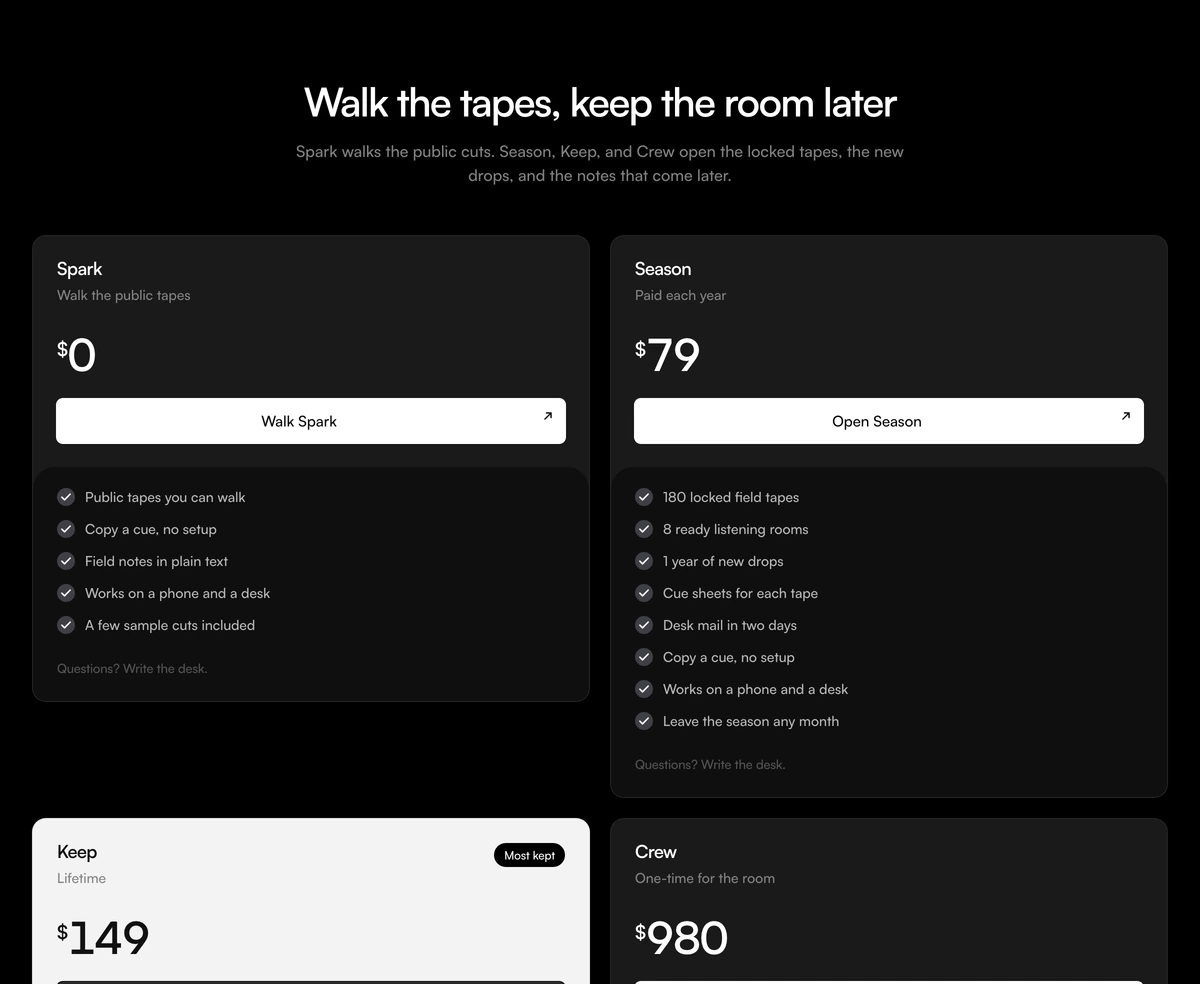
ProFour plans in a row: free, yearly, lifetime and a one time team license. The lifetime card is inverted, dark on a light page and light on a dark one, with a badge, so it is the first thing people see. Each card lists its features with soft checks, adds extras under a plus rule, and ends with a button and a link to ask a question.
Make the one time option the obvious choice
Pricing Section with Lifetime Highlight is a React and Tailwind CSS pricing section that puts a lifetime deal at the centre of the decision, with a free tier, a yearly subscription and a team license around it. It runs in Next.js or any React app in light and dark.
Lifetime plans convert best when they are framed against a subscription: visitors see the yearly price, then a lifetime price that equals two or three years of it, and the comparison does the selling. Inverting the colours of that one card is a strong, simple cue that needs no extra copy.
The block is static. Prices are strings, so you can write them however your market expects, including currencies and one time wording.
Card structure
Inverted card
A plan flagged inverted swaps its colours against the theme, dark on light pages and light on dark ones.
Price
The price string is split into currency symbol and amount, so the symbol can be styled smaller.
Features and extras
Grey circle checks for the main list, then a plus rule and indigo accent checks for extras.
Button
A black button with a gradient sheen and an arrow, white on the inverted card.
Question link
Under each card, a link such as Questions? Write to us, set by chatLabel and chatHref.
When to highlight lifetime
Use it when
- You sell in several currencies or need wording such as one time, since price is a free string rather than a number.
- Tools, templates and indie software that sell a one time license beside a subscription.
- You want the lifetime plan to be the default choice.
- A team or agency license completes the range.
- Four plans fit your offer.
Skip it when
- Your plans need a monthly or yearly switch; this block shows each plan at one price only.
- You cannot sustain lifetime access economically; the layout pushes people towards it.
- Pure subscription businesses with monthly and annual only.
- You need the badge text to change without editing the file.
- Fewer than three plans.
Write the four plans
Each plan takes an id, name, subtitle, price as a string, a cta, features, optional extras, and popular and inverted flags. Set both popular and inverted on the plan you want to stand out. The badge text on the popular card is written in the component, so edit it there.
Write subtitles that say how the plan is paid, such as billed yearly, pay once or per team, so the difference is clear before anyone reads the features.
Order the plans so the lifetime card follows the yearly one. Buyers read left to right, see the yearly figure first, and then judge the one time price against it, which is the comparison that makes a lifetime deal feel worth it.
npx wensity@latest add pricing-section-with-lifetime-highlight --type block
import { LifetimeHighlightPricing } from "@/components/wensity/blocks/pricing-section-with-lifetime-highlight";export function Pricing() {return (<LifetimeHighlightPricingheadline="Buy once, or keep it yearly"chatLabel="Questions? Email us."chatHref="mailto:hello@example.com"plans={[{ id: "free", name: "Free", subtitle: "Forever", price: "$0", cta: { label: "Start", href: "/signup" }, features: ["3 projects"] },{ id: "yearly", name: "Yearly", subtitle: "Billed every year", price: "$59", cta: { label: "Subscribe", href: "/buy/yearly" }, features: ["Unlimited projects", "Updates while subscribed"] },{ id: "lifetime", name: "Lifetime", subtitle: "Pay once", price: "$129", cta: { label: "Buy lifetime", href: "/buy/lifetime" }, features: ["Unlimited projects", "All future updates"], popular: true, inverted: true },{ id: "team", name: "Team", subtitle: "One time, 10 seats", price: "$690", cta: { label: "Buy for a team", href: "/buy/team" }, features: ["Everything in Lifetime", "Shared license"] },]}/>);}
Props
| Prop | Type | Default | Description |
|---|---|---|---|
plans | { id; name; subtitle; price: string; cta; features; extras?; popular?; inverted? }[] | Spark, Season, Keep, Crew | Four cards. inverted flips colours; popular adds the badge. |
chatLabel / chatHref | string | - | Question link under every card. |
headline / subtext | string | - | The heading above the row and one sentence on how the plans relate. |
Implementation notes
No state
There is no billing toggle or interaction beyond links, so the section can render on the server.
Theme inversion
The inverted card uses opposite theme classes, so check its contrast in both modes after recolouring.
Hardcoded badge
The popular badge text is in the component rather than a prop.
Nothing animates
Hover states only, so there is no motion to reduce.
Responsive columns
One column on phones, two from 640px and four from 1280px, so the lifetime card is never squeezed on tablets.
Steady figures
The amount uses tabular numerals, so prices of different lengths line up across the four cards.
Block details
- Category
- Pricing Sections
- Renders
- CSS only. Paints as soon as the stylesheet arrives
- Theme
- Follows the site theme in light and dark
- Dependencies
clsxtailwind-merge- Source
- 340 lines, 11 KB in one file
- Install
wensity add pricing-section-with-lifetime-highlight --type block- Tags
- light, dark, pricing, lifetime, access, saas
- Last updated