React Pricing Cards with Nested Everything In Plus Feature Lists
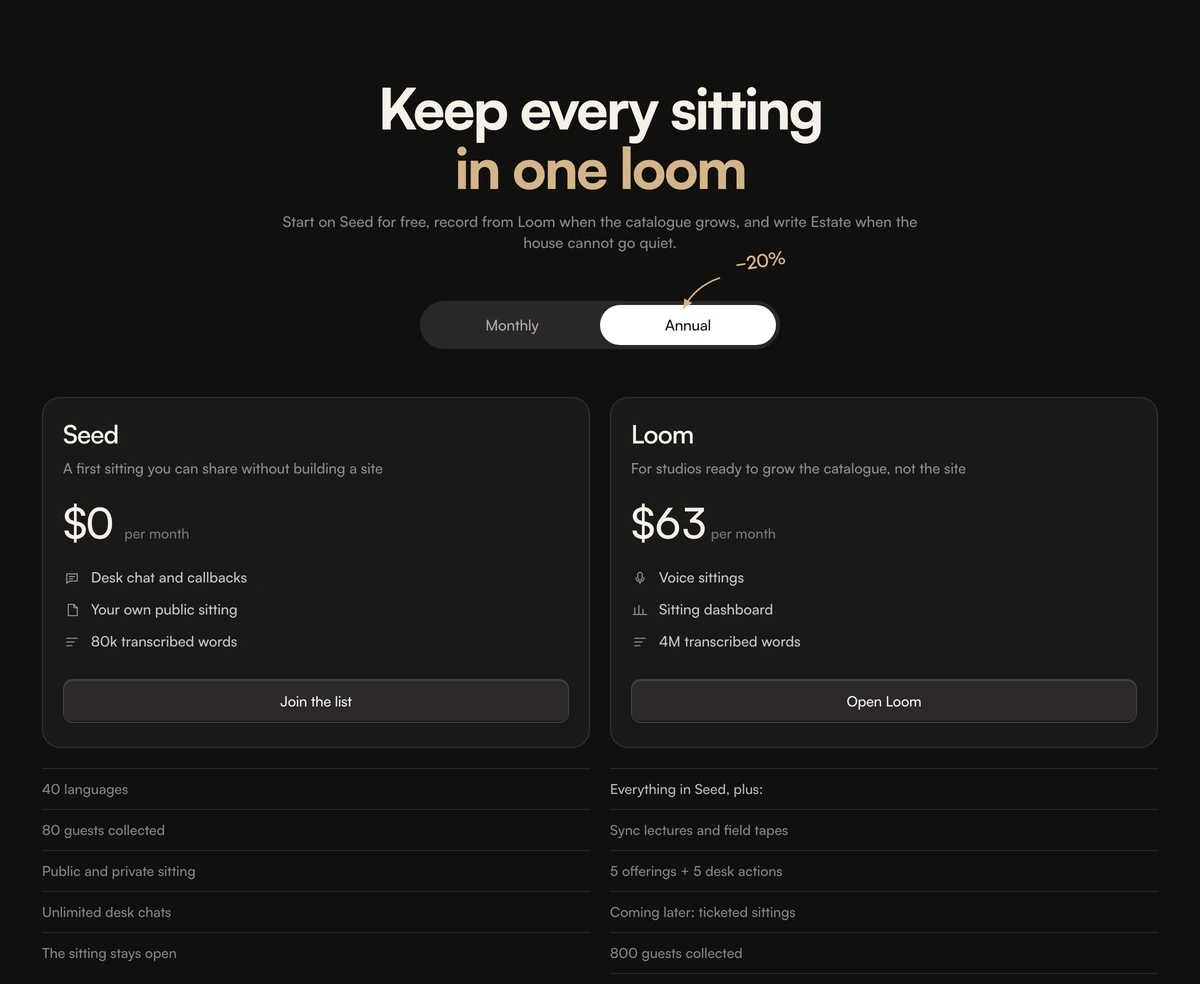
ProFour plans on warm parchment, each a card with a bold plan name, a short description, the price and three highlights with icons. Under each card a ruled list begins Everything in the previous plan, plus, and names only what is new, so the eye moves up the tiers without rereading the same features four times.
Inheritance makes long feature lists short
Pricing Section with Nested Feature Lists is a React and Tailwind CSS pricing section where every tier's feature list inherits the tier below it, shown as Everything in X, plus a short list of additions. It works in Next.js or any React app, with a warm light palette and a dark variant.
Repeating every feature on every card makes higher tiers look like walls of text and hides what you actually pay more for. Nesting answers the only question a buyer has when looking one tier up: what do I get on top. It also keeps the four cards similar in height.
A small tilted note with a hand drawn arrow points at the annual option and shows the saving in the same warm gold as the second headline line, which gives the section a personal, crafted tone.
Card and list structure
Plan card
Plan name, description, price or custom, three highlight rows with icons and a button. The top plan can be emphasised with an orange button.
Icon highlights
Each highlight picks one icon from a fixed set: chat, page, words, voice, analytics, video, architecture, setup or unlimited.
Nested extras
Below the card, an intro line such as Everything in Loom, plus, followed by a ruled list of extras, an optional accent link and an optional second list.
Billing toggle
Monthly and Annual as a radiogroup with a sliding pill, plus the hand drawn saving note with an arrow on screens 640px and wider.
Responsive grid
One column on phones, two on tablets and four on desktop.
When nested lists help
Use it when
- Four tiers where each adds features to the one below.
- Feature lists long enough that repeating them would overwhelm the cards.
- Editorial, creative or knowledge products that suit warm parchment tones.
- A custom priced top tier you want to emphasise.
Skip it when
- Plans that differ by limits rather than features; a comparison table shows numbers better.
- Fewer than three tiers, where nesting adds little.
- Strict reduced motion compliance without edits, since the toggle pill animates for everyone.
- Cool, technical brand palettes that clash with parchment.
Model the tiers
Each plan takes an id, name, description, monthly price or custom, three highlights with an icon key and label, an extrasIntro, an extras list, optional extrasAfter and accentExtra, a cta and an optional emphasized flag. Write extrasIntro as the bridge sentence, for example Everything in Team, plus.
The headline is split into headlineLead and headlineAccent so the second half can take the accent style. annualDiscount sets the maths and annualSaveLabel sets the note shown by the arrow.
npx wensity@latest add pricing-section-with-nested-feature-lists --type block
import { NestedFeaturePricing } from "@/components/wensity/blocks/pricing-section-with-nested-feature-lists";export function Pricing() {return (<NestedFeaturePricingheadlineLead="Grow from one desk"headlineAccent="to the whole office"plans={[{id: "solo",name: "Solo",description: "For one writer.",monthly: 0,highlights: [{ icon: "page", label: "10 documents" }],extrasIntro: "Includes",extras: ["Export to PDF"],cta: { label: "Start free", href: "/signup" },},{id: "team",name: "Team",description: "For small teams.",monthly: 18,highlights: [{ icon: "chat", label: "Comments" }],extrasIntro: "Everything in Solo, plus",extras: ["Shared folders", "Version history"],cta: { label: "Choose Team", href: "/signup?plan=team" },},]}/>);}
Props
| Prop | Type | Default | Description |
|---|---|---|---|
plans | NestedPlan[] | Seed, Loom, Vault, Estate | Four plans with highlights, nested extras and a button each. |
plans[].highlights | { icon: "chat" | "page" | ...; label: string }[] | - | Three icon rows on the card. Icons come from a fixed set of nine. |
plans[].extrasIntro | string | - | The Everything in X, plus line above the extras. |
headlineLead / headlineAccent | string | - | Two halves of the heading, the second styled as the accent. |
annualDiscount | number | 0.2 | Saving applied to monthly prices in annual mode. |
annualSaveLabel | string | - | Text of the hand drawn note beside the toggle. |
Details from the source
Toggle animation
The sliding pill uses a tween with no reduced motion check. MotionConfig with reducedMotion set to user makes it instant.
Accessible toggle
Monthly and Annual are a radiogroup, announced as a choice between two options.
Decorative note
The hand drawn saving note is hidden below 640px, so make sure the saving is also stated in text that phones can see.
Two palettes
Warm parchment in light mode and a dark brown black in dark mode.
Custom top tier
Set monthly to custom on the last plan and emphasized to true to give it the orange button, the usual pattern for a contact sales tier.
Fixed icon set
Highlight icons are limited to the nine built in keys. Adding one means drawing it into the component's icon map.
Block details
- Category
- Pricing Sections
- Renders
- JavaScript animation. Paints first, then animates
- Theme
- Follows the site theme in light and dark
- Dependencies
clsxframer-motiontailwind-merge- Source
- 441 lines, 15 KB in one file
- Install
wensity add pricing-section-with-nested-feature-lists --type block- Tags
- light, dark, pricing, tiers, saas
- Last updated