React Pricing Section with a Soft Gradient Background and Yearly Toggle
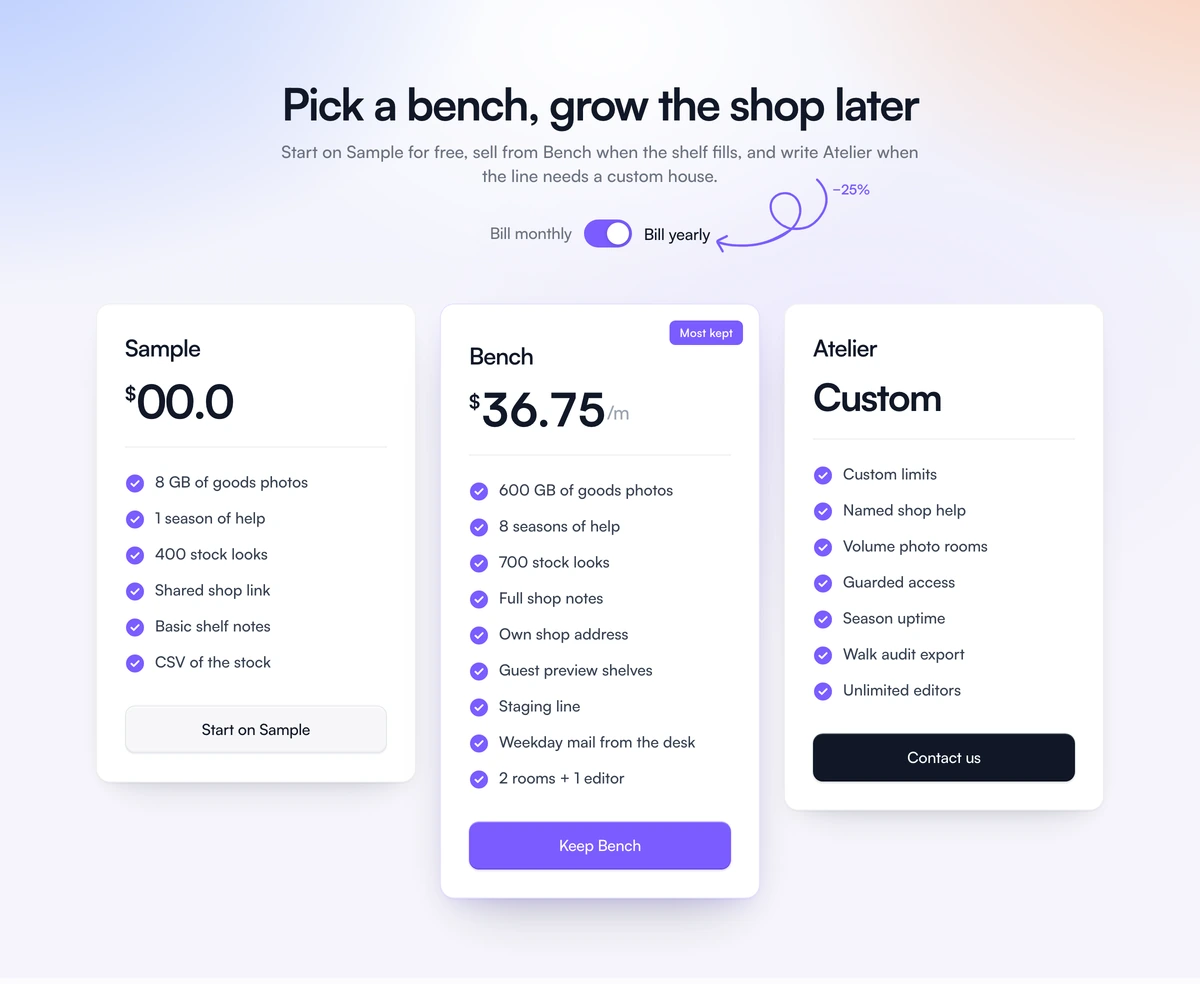
ProThree clean white plan cards on a pastel wash: soft blue in one corner, peach in the other, lavender underneath. The middle plan carries a badge and a violet button, the contact plan a dark one, and a switch at the top flips prices to yearly with a hand drawn arrow pointing at the saving.
Gentle colour around plain cards
Pricing Section with Soft Gradient is a React and Tailwind CSS pricing section with a soft mesh gradient background made from four layered radial gradients, three plan cards and a yearly billing switch. It is designed for light themed sites in Next.js or any React app.
Most pricing page design advice says the same thing: keep the cards plain and let the page around them carry the mood. Here the cards are white with simple feature lists, and the colour lives entirely in the background, which keeps prices easy to read while the section still looks finished.
It is light only by design and sets its colour scheme to light, so it keeps its pastel look even when the site around it is dark.
Pieces of the gradient section
Mesh background
Four radial gradients, blue at the top left, peach at the top right, white at the top centre and lavender low down, over #f6f5fb.
Plan cards
Up to 320px wide, three in a row on large screens, with a price, features and a button.
Popular and contact styles
The popular plan gets a badge and a violet button; a contact plan gets a dark button for talking to sales.
Yearly switch
A switch with an accessible name, Bill monthly and Bill yearly labels, and a knob that moves instantly for reduced motion.
Hand drawn arrow
A scribbled arrow with the saving label, shown from 640px up.
Who should use it
Use it when
- Light themed consumer and creator products with three plans.
- You want a friendly, approachable pricing page without illustration.
- One plan is clearly the recommended choice.
- You offer a yearly discount worth calling out.
Skip it when
- Dark sites; the section stays light.
- You have a free plan and cannot patch the price formatting bug described below.
- You need prices rounded to whole numbers without editing the file.
- More than three plans.
Plans, discount and two fixes
plans takes id, name, a monthly number or custom, features, and optional popular, contact and cta fields. yearlyDiscount sets the saving, 0.25 by default, and yearlySaveLabel sets the note by the arrow. The badge text on the popular plan is written in the component.
Fix two things before launch. A plan priced at 0 currently renders as $00.0; special case zero to show Free or $0. Yearly prices are not rounded, so 49 at 25 percent off shows $36.75; round the computed figure or set prices that divide cleanly.
To recolour the background, change the four radial gradient colours together. Keep them pale; the cards are white and rely on the contrast between a soft background and a crisp edge.
npx wensity@latest add pricing-section-with-soft-gradient --type block
import { SoftGradientPricing } from "@/components/wensity/blocks/pricing-section-with-soft-gradient";export function Pricing() {return (<SoftGradientPricingheadline="Plans that grow with your shop"yearlyDiscount={0.2}yearlySaveLabel="Save 20%"plans={[{ id: "starter", name: "Starter", monthly: 10, features: ["50 products", "Card payments"] },{ id: "growth", name: "Growth", monthly: 30, features: ["Unlimited products", "Discount codes"], popular: true },{ id: "scale", name: "Scale", monthly: "custom", features: ["Multiple stores", "Priority support"], contact: true, cta: { label: "Talk to us", href: "/contact" } },]}/>);}
Props
| Prop | Type | Default | Description |
|---|---|---|---|
plans | { id; name; monthly: number | "custom"; features; popular?; contact?; cta? }[] | - | Three cards. popular adds the badge and violet button; contact switches to the dark button. |
yearlyDiscount | number | 0.25 | Fraction removed from monthly prices when yearly billing is on. |
yearlySaveLabel | string | - | The saving shown by the hand drawn arrow. |
headline / subtext | string | - | Heading and paragraph above the switch. |
Known issues and behaviour
Discount maths
Yearly prices are the monthly figure multiplied by one minus yearlyDiscount, computed at render, which is why uneven results show decimals.
Zero price formatting
A monthly value of 0 renders as $00.0. Handle zero before formatting.
Unrounded yearly prices
The yearly figure is shown with decimals when the discount does not divide evenly.
Reduced motion
The switch knob moves instantly for visitors who prefer reduced motion.
Fixed labels
Bill monthly, Bill yearly and the popular badge are written in the file.
Light scheme forced
The section declares color-scheme light, so form controls and scrollbars inside it stay light even on a dark site.
Card width
Cards are capped at 320px and sit in a row inside a 1120px container, which keeps prices close together on wide screens.
Block details
- Category
- Pricing Sections
- Renders
- JavaScript animation. Paints first, then animates
- Theme
- Fixed light surface. No dark variant
- Dependencies
clsxframer-motiontailwind-merge- Source
- 356 lines, 18 KB in one file
- Install
wensity add pricing-section-with-soft-gradient --type block- Tags
- light, pricing, gradient, toggle, saas
- Last updated