React Black Hole Hero Section with a WebGL Animation
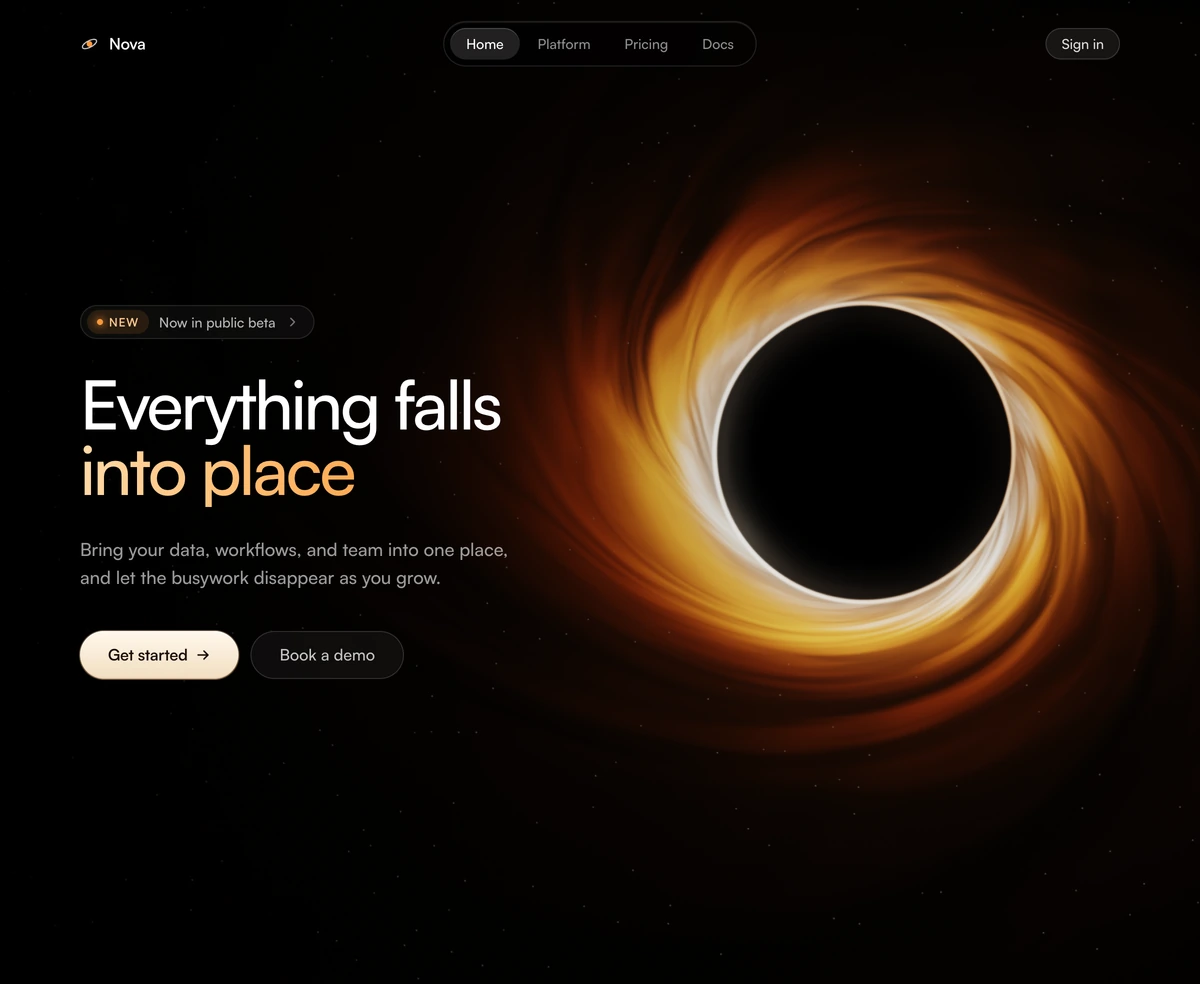
ProA black hole fills the dark hero: a glowing accretion disk tilted towards you, light bent around the shadow at its centre, a bright photon ring and faint stars beyond. A pill shaped navbar floats above, and the headline, buttons and an optional install command sit on the darker side of the frame.
A physically inspired black hole in the browser
Hero Section with Black Hole is a React hero section with a real time black hole animation rendered in raw WebGL2: an accretion disk with gravitational lensing, Doppler brightening, a photon ring and a bloom pass, behind your headline and calls to action. It needs no Three.js and runs in Next.js or any React app.
Every control a physicist would name is a prop: disk tilt and roll, swirl, flow speed, how far the disk reaches, lensing strength, Doppler beaming, photon ring intensity and star density, plus three colours for the hot, mid and cool parts of the disk. That lets you push it from a calm, distant object to a blazing close up.
It is engineered to be polite. The animation stops when the hero is offscreen or the tab is hidden, it lowers resolution on software renderers, it recovers from a lost WebGL context, and visitors who prefer reduced motion get a settled still frame.
Inside the black hole hero
Multi pass render
A scene pass draws the disk and lensing, a bright pass extracts highlights, a blur spreads them and a composite adds the bloom back. WebGL2 is used with a WebGL1 fallback.
Responsive composition
On wide screens the hole sits high on the right with a scrim on the left for text. On narrow screens it moves low and centred, with a top scrim and a lower resolution.
Floating pill navbar
Brand, links with aria-current on the active one, a Sign in button and a mobile toggle with aria-expanded. Pass an empty navLinks array to hide it.
Announcement chip
An optional pill above the headline, set to null to remove it.
Gold last line
With accentLastLine on, the final headline line takes a warm gradient that matches the disk.
Install command
Set command and the secondary button becomes a copy to clipboard command line, with a live region announcing that it was copied.
When to use a black hole
Use it when
- Developer tools, data platforms and AI products whose pitch is gravity: everything pulled into one place.
- Launch pages that need a memorable first screen without a video.
- Products with a CLI install, which the command prop puts right in the hero.
- Dark sites where a built in navbar saves a separate header.
Skip it when
- Light themed sites; the hero is black by design.
- Pages where every kilobyte counts; the file is large because the renderer is complete.
- You already have a site header and do not want two navbars; hide this one with navLinks set to an empty array.
- Calm, corporate brands for whom a cosmic hero overstates the product.
Tune the physics and the copy
Start with copy: headline with a newline, subtext, primaryCta, and either secondaryCta or command for an install line. Then shape the object. tilt and roll set the viewing angle, swirl and flowSpeed control how the disk moves, lensing and photonRing set how strongly light bends, and hotColor, midColor and coolColor recolour the disk from white hot to ember.
For performance, maxDpr caps pixel density at 1.75 by default and resolution scales the internal render. Set paused to true to show a still frame, for example on a page where the hero is decorative.
npx wensity@latest add hero-section-with-black-hole --type block
import { PhotonRingHero } from "@/components/wensity/blocks/hero-section-with-black-hole";export default function Page() {return (<PhotonRingHerobrand="Gravity"navLinks={[]}announcement={{ label: "v2 is out", href: "/changelog" }}headline={"All your logs,\none event horizon"}subtext="Ship every log line to one place and query it in milliseconds."primaryCta={{ label: "Start free", href: "/signup" }}command="npm i @gravity/agent"hotColor="#E0F2FE"midColor="#38BDF8"coolColor="#0C4A6E"/>);}
Props
| Prop | Type | Default | Description |
|---|---|---|---|
command | string | "" | An install command shown in place of the secondary button, with a copy button. |
tilt / roll | number | 38 / -16 | Viewing angle of the disk in degrees. |
hotColor / midColor / coolColor | string | #FFF3DE / #FF9838 / #8E3A0B | Disk colours from the inner edge out. |
lensing / photonRing / doppler | number | 1 / 1 / 0.55 | Strength of light bending, the bright ring and one sided beaming. |
navLinks | { label: string; href: string }[] | - | Links in the floating pill. An empty array hides the navbar. |
maxDpr | number | 1.75 | Upper bound on pixel density for the canvas. |
paused | boolean | false | Renders one settled frame and stops. |
How it stays fast and accessible
Stops when unseen
An IntersectionObserver and the page visibility API pause rendering when the hero leaves the viewport or the tab is hidden.
Reduced motion
Visitors who prefer reduced motion see a still, settled frame with no animation loop.
Graceful failure
If WebGL is unavailable the canvas hides and the black section remains, so the copy is never lost. Lost and restored contexts are handled.
Software renderers
The block detects software rendering and halves its internal resolution so laptops without a GPU stay responsive.
Two small dependencies
Only clsx and tailwind-merge. The renderer is written against WebGL directly, so there is no 3D library to install.
Block details
- Category
- Hero Sections
- Renders
- WebGL canvas. Compiles a shader before the first frame
- Theme
- Fixed dark surface. No light variant
- Dependencies
clsxtailwind-merge- Source
- 1,284 lines, 46 KB in one file
- Install
wensity add hero-section-with-black-hole --type block- Tags
- webgl, shader, space, glow, split, dark
- Last updated