React Warp Tunnel Background, a Hyperspace Shader in WebGL
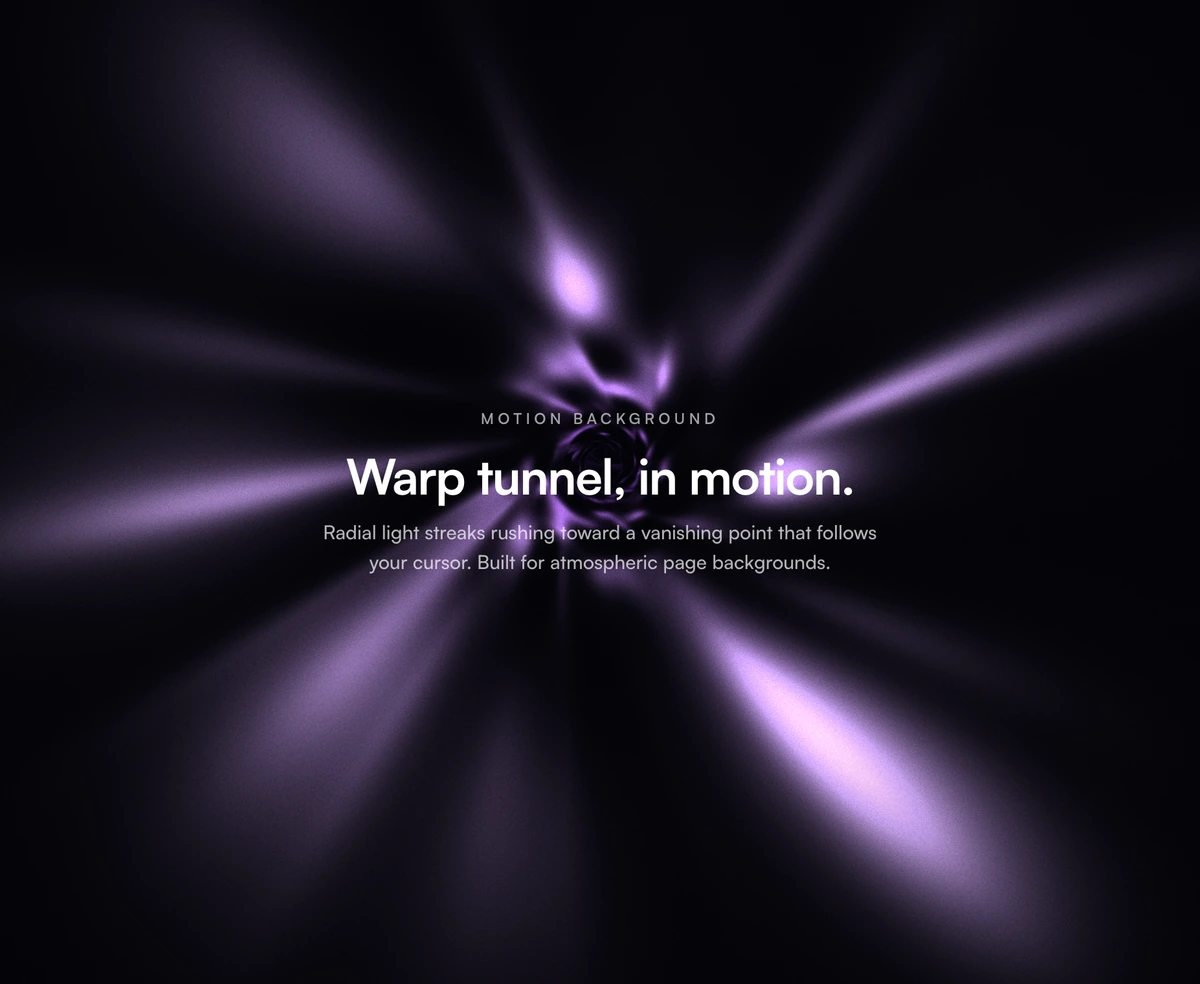
ProLight streaks rush out of a vanishing point at the centre of the section, twisting slightly as they come, fading into fog in the distance. It is the hyperspace jump from science fiction, rendered in violet by default, and the tunnel's centre drifts towards wherever the cursor is.
Motion that points forward
Animated Background with Warp Tunnel is a React warp speed background: a WebGL shader that maps the screen into polar coordinates and draws light streaks travelling through a tunnel towards the viewer, with spiral twist and depth fog. It uses Three.js and React Three Fiber in Next.js or any React app.
Forward motion reads as speed and progress, which is why tunnel effects show up on launch pages, product reveals and performance claims. Because this one is a shader rather than a video, it loops forever without a seam, scales to any screen and recolours with three hex values.
The vanishing point is interactive. Move the pointer and the centre of the tunnel slides towards it while the whole field drifts with a little parallax, which makes visitors feel they are steering.
How the tunnel is drawn
Polar mapping
Screen coordinates are converted to angle and distance from the vanishing point. Angle picks a lane, and inverse distance becomes depth, which is why streaks speed up as they near the edges.
Streak lanes
Two layers of streaks, about 14 lanes and a denser set at 2.3 times that, scrolling at different rates. streaks scales both and stretch lengthens them along the depth axis.
Twist
Lanes rotate with depth by 0.35 turns by default, so streaks curve slightly rather than shooting out in straight spokes.
Fog and vignette
Fog fades streaks as they approach the vanishing point, giving the tunnel depth, and a vignette at 0.35 darkens the corners.
Steerable centre
mouseInfluence moves the vanishing point towards the pointer and parallax adds a camera drift. Even untouched, the centre wobbles slightly so the tunnel never looks frozen.
When a tunnel is the right metaphor
Use it when
- Launch announcements, countdowns and product reveal pages.
- Products whose pitch is speed, such as builds, deploys or data pipelines.
- Short, dark hero sections with a bold headline over the centre.
- Event and gaming sites that welcome high energy visuals.
Skip it when
- Calm brands or long reading pages; this is the most intense background in the set.
- Audiences prone to motion sickness without reduced motion respected. Never turn respectReducedMotion off here.
- Sections with lots of body text, since the streaks pull the eye to the centre.
- Pages that cannot load Three.js.
Recolour and slow it down
Install the block with three, @react-three/fiber and next-themes in your project, then pass your hero as children. The defaults are three violets on a near black base, and a deeper set on a warm off white for light mode. Any three colours work; a white, a mid tone and a deep shade of one hue keep the tunnel readable.
speed 1 is fast. For a background behind a headline, 0.4 to 0.6 is calmer, and lowering stretch shortens the streaks into points, which reads more like a starfield than a jump to light speed.
npx wensity@latest add animated-background-with-warp-tunnel --type block
import { WarpTunnelBackground } from "@/components/wensity/blocks/animated-background-with-warp-tunnel";export function LaunchHero() {return (<WarpTunnelBackgroundtheme="dark"colorsDark={["#e0f2fe", "#38bdf8", "#0369a1"]}config={{ speed: 0.5, twist: 0.2, stretch: 0.8 }}minHeight={600}><div className="mx-auto max-w-2xl px-6 py-48 text-center"><h1 className="text-5xl font-semibold text-white">Builds in seconds.</h1></div></WarpTunnelBackground>);}
Props
| Prop | Type | Default | Description |
|---|---|---|---|
colors / colorsLight / colorsDark | string[] | - | Three stops along the depth: the first tints streaks near the mouth, the last tints them as they recede into the distance. |
config.speed | number | 1 | Travel speed. Halve it behind text. |
config.streaks | number | 1 | Lane density multiplier, about 14 lanes at 1. |
config.twist | number | 0.35 | Spiral in turns. Zero gives straight spokes. |
config.stretch | number | 1 | Streak length along depth. Lower values turn streaks into stars. |
config.fog | number | 1 | How quickly streaks vanish towards the centre. |
Motion safety and load
Vestibular safety
Motion towards the viewer is the pattern most likely to trigger discomfort. The block stops animating for visitors who set reduced motion and shows one still frame of the tunnel instead.
Keeps running offscreen
No visibility check pauses the loop, so a tunnel above the fold keeps drawing after the visitor scrolls down. Pause it with config.animate or unmount it when out of view.
Retina rendering
Pixel ratio is capped at 2. Thin streaks benefit from the extra resolution; on weak GPUs, lowering the cap is the first thing to try.
Form fields over the tunnel
Children sit in a layer that ignores pointer events except on links and buttons. Give inputs pointer-events-auto.
Block details
- Category
- Motion
- Renders
- WebGL canvas. Compiles a shader before the first frame
- Theme
- Follows the site theme in light and dark
- Dependencies
@react-three/fiberclsxnext-themestailwind-mergethree- Source
- 516 lines, 17 KB in one file
- Install
wensity add animated-background-with-warp-tunnel --type block- Tags
- webgl, three.js, shader, tunnel, radial, streaks, light, dark, background
- Last updated