Magic Link Login Page for React
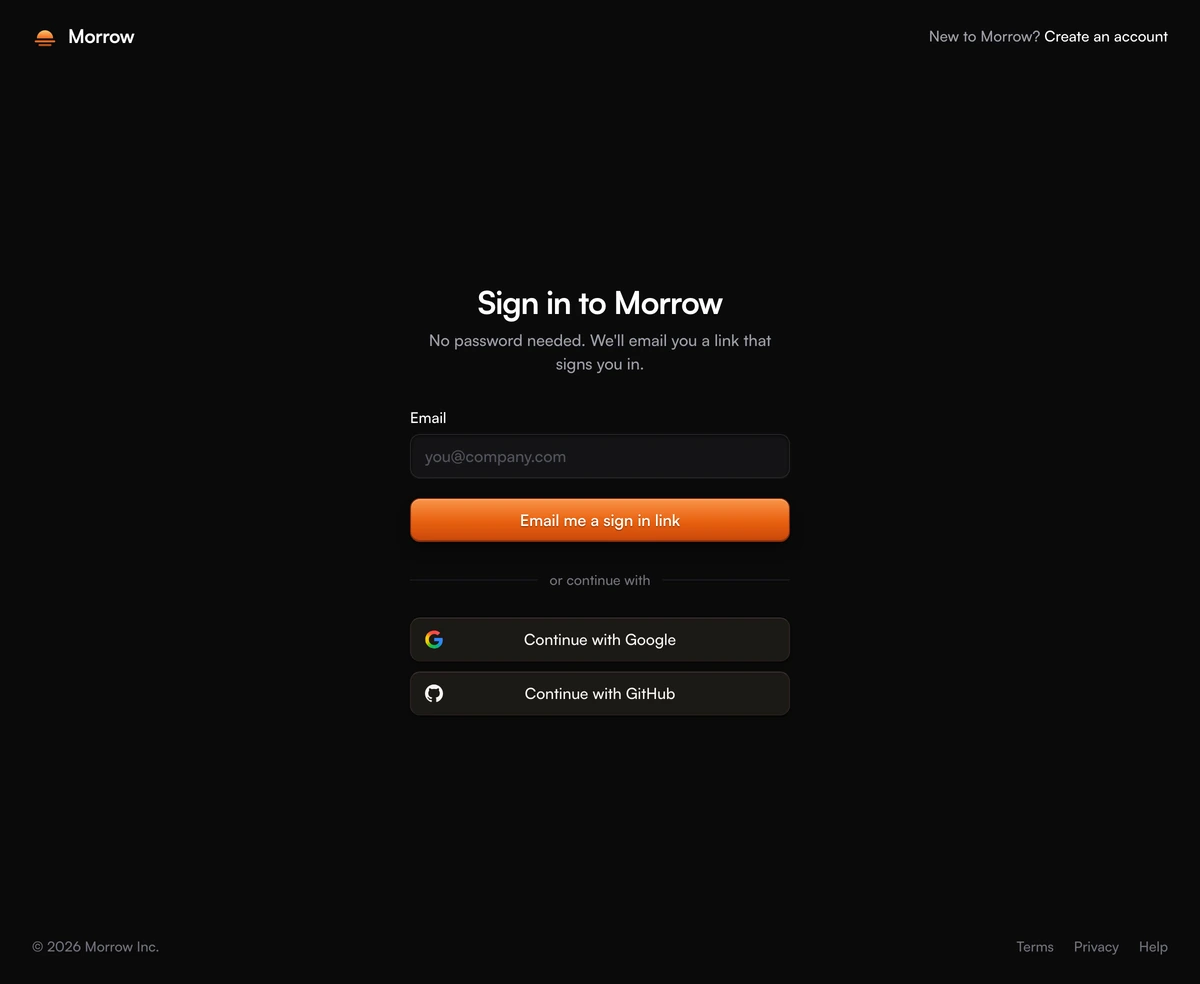
ProA sign in page with no password field. Someone types their email, presses Email me a sign in link, and the page turns into a check your inbox screen with a shortcut to their webmail, a resend timer and a way back to fix a typo. Google and GitHub wait under the form for anyone who would rather skip the email. The brand colour is a sunrise, amber falling into deep ember, carried by the mark, the envelope and the main button.
How a magic link login page works
Login Page With Magic Link is a React and Tailwind CSS passwordless login page that emails a one time sign in link instead of asking for a password, in Next.js or any React app. It covers the two screens that the person actually sees: the request form and the wait for the email. Creating the token, sending it and verifying the link when it is clicked all stay on your server, through whatever auth library you already use.
Most magic link screens stop at a line of text that says an email was sent. That leaves people hunting through tabs for their inbox, unsure whether to wait or try again. Here the waiting screen does the work: it repeats the address so a typo is obvious, reads the email's domain to offer Open Gmail, Open Outlook, iCloud Mail, Yahoo Mail or Proton Mail, and counts down thirty seconds before the resend link wakes up, so nobody fires off five emails while the first one is still on its way.
Passwordless sign in suits products people open a few times a month, where a forgotten password is the most common support ticket. It also removes the reset flow entirely, since there is nothing to reset.
What the passwordless login page is made of
A header, one 380px column and a footer, on a page at least as tall as the screen and never shorter than 820px (900px from 1024px up). From 1024px up the column centers vertically; on smaller screens it starts just under the header.
Header
The Morrow mark, a sun half risen over two lines of light in an amber to ember gradient, sits beside the brand name on the left. On the right is New to Morrow? Create an account; below 640px only the link stays.
Request form
A heading, one sentence promising no password, a single recessed Email field and the Email me a sign in link button. The field checks for an address shaped like name@domain before anything is sent.
Sunrise button
The primary button is filled with the brand gradient, amber at the top into ember at the base, with a lit top edge and a warm drop shadow. Dark mode uses a slightly deeper version of the same colours. While the email sends it reads Sending link beside a spinner.
Google and GitHub
Below an or continue with divider, two full width rows read Continue with Google and Continue with GitHub, with each logo pinned to the left edge. Their faces are warm stone rather than grey so they sit with the orange.
Check your inbox
A drawn envelope in the brand colours with a letter standing out of it, the heading, the address in bold and how long the link lasts. Under that come the webmail buttons, a resend line with its countdown and Use a different email.
Footer
The copyright on the left and a Legal navigation of Terms, Privacy and Help on the right, stacked and centered on phones.
When to use a magic link login
Use it when
- Your auth provider already sends sign in links: Better Auth, Supabase, Auth.js, Clerk or your own tokens.
- People sign in now and then, and forgotten passwords make up a large share of your support mail.
- You want new and returning users on one screen, and your provider can create the account the first time a link is used.
- A warm orange accent fits the product, or you are happy to recolour the mark, envelope and button together.
Skip it when
- Your users sign in on one device and read email on another. A link signs in the browser it opens in, and this page has no code entry box for typing a one time code instead.
- Accounts must have a password. Use the centered card or the minimal form, which both send email and password together.
- Mail delivery is slow or filtered at your customers' companies. Every sign in waits on the inbox.
- You are building the sign up route and want a name field and terms checkbox. The password strength meter block covers that.
Connect the magic link login to your auth
Two handlers do the real work. onSendLink receives the trimmed email after it passes the check, and should ask your server to create a token and send the email. While its promise runs the field is read only and the button spins; when it resolves the page switches to the inbox screen and moves focus to its heading. Throw an Error and its message appears in a red alert above the button instead. The same function runs again when someone presses resend, so a rate limit error from your server shows up in the note under that line.
onProviderSignIn gets google or github and should start your OAuth redirect. The pressed row spins while the others dim. The defaults for both handlers are demos that wait about a second and always succeed, so the preview never shows an error until you connect real ones.
The waiting screen says the link works once and lapses after expiresInMinutes, which defaults to 15. Those words are only copy: make your server enforce the same rules, single use and the same lifetime, or change the number to match. If your webmail shortcuts are wrong for a market, turn them off with showInboxLinks false.
npx wensity@latest add login-page-with-magic-link --type block
import { LoginPageMagicLink } from "@/components/wensity/blocks/login-page-with-magic-link";import { authClient } from "@/lib/auth-client";export default function SignInPage() {return (<LoginPageMagicLinkheadingAs="h1"brandName="Acme"brandHref="/"heading="Sign in to Acme"signUpHref="/sign-up"expiresInMinutes={15}copyright="© 2026 Acme Inc."onSendLink={async (email) => {const { error } = await authClient.signIn.magicLink({ email, callbackURL: "/app" });if (error) throw new Error(error.message ?? "We couldn't send the link. Try again.");}}onProviderSignIn={(provider) => authClient.signIn.social({ provider, callbackURL: "/app" })}/>);}
Props
| Prop | Type | Default | Description |
|---|---|---|---|
onSendLink | (email) => Promise<void> | void | - | Sends the sign in email. Called again by resend. Throw an Error to show its message. |
onProviderSignIn | (provider) => Promise<void> | void | - | Starts Google or GitHub sign in. The row spins until the promise settles. |
expiresInMinutes | number | 15 | The lifetime quoted on the inbox screen. Keep it equal to your server's token expiry. |
showInboxLinks | boolean | true | The Open Gmail style buttons picked from the email's domain. false hides them. |
providers | ("google" | "github")[] | ["google", "github"] | Rows under the form. An empty array removes them and the divider. |
heading | string | "Sign in to Morrow" | The first screen's heading. description sets the line about not needing a password. |
brandName | string | "Morrow" | Shown in the header and in the New to line. |
signUpHref | string | "#" | Where Create an account points. brandHref, footerLinks and copyright set the rest of the chrome. |
Accessibility, motion and weight
Focus follows the screen
When the inbox screen appears, focus moves to its Check your inbox heading so screen readers start there. Use a different email returns to the form and selects the old address, ready to be typed over.
Spoken status
A polite live region announces Sending your sign in link and Connecting to Google or GitHub. A failed send uses role alert, and the resend note is its own polite region.
No dead buttons
While a request runs, buttons use aria-disabled and the field goes read only, so keyboard focus is never dropped. The resend control stays focusable through its countdown and simply does nothing until the timer reaches zero.
Links that say where they go
Webmail buttons open in a new tab with rel noreferrer and carry hidden text telling screen reader users so. The email field uses autocomplete email and an email keyboard on phones.
Motion kept small
Switching screens fades the column up 6px over 280ms, and only after a click, never on first paint. prefers-reduced-motion turns that off, stops the spinners and removes colour transitions.
What it loads
No animation library: React state, Tailwind classes and one keyframe in a plain style tag. @tabler/icons-react supplies the alert, back arrow and external link icons, the mark, envelope and GitHub logo are inline SVG, and the Google logo loads from assets.wensity.com.
Block details
- Category
- Login Pages
- Renders
- CSS only. Paints as soon as the stylesheet arrives
- Theme
- Follows the site theme in light and dark
- Dependencies
@tabler/icons-reactclsxtailwind-merge- Source
- 628 lines, 30 KB in one file
- Install
wensity add login-page-with-magic-link --type block- Tags
- light, dark, login, sign in, form, auth, magic link, magic link login, passwordless login
- Last updated