 Black Friday is here 🔥 Get
React Footer with a Newsletter Signup Form
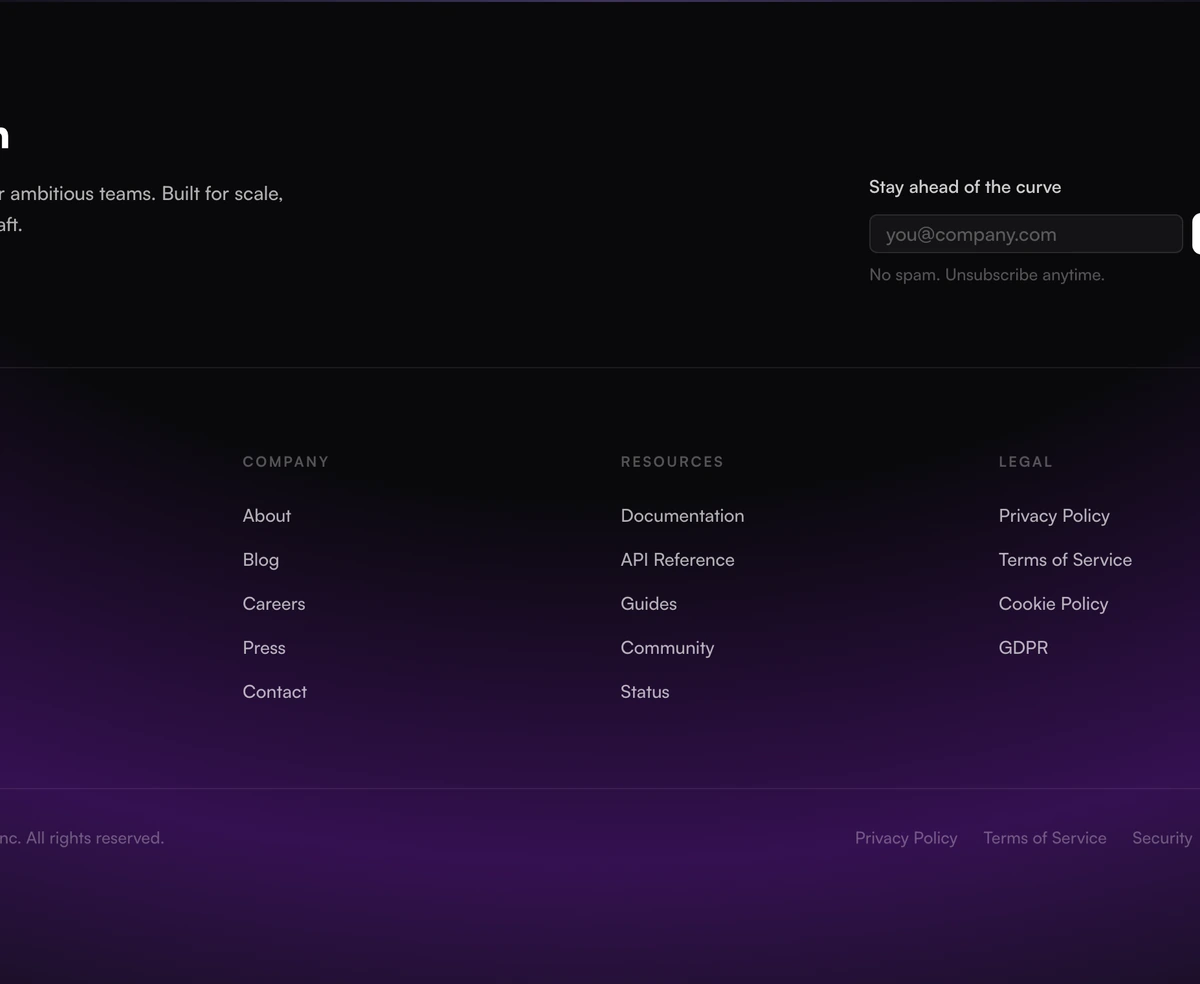
ProThe footer most product sites end up needing: your brand and a line about it on the left, an email field with a Subscribe button on the right, four columns of links below, and a slim bar for legal links at the very bottom, all over a faint violet radial glow.
The last chance to keep a reader
Footer with Newsletter Signup is a React and Tailwind CSS footer that combines a newsletter subscription form with standard link columns, so a visitor who reaches the end of an article or landing page can join your list before they leave. It works in Next.js or any React project, in light and dark.
People who scroll all the way down are your most engaged readers, which makes the footer one of the best places on a site to ask for an email address. The block gives the form the right half of the top row on desktop, where it lines up with the brand block instead of hiding under the links.
It ships as the interface only. Submitting the form shows a thank you line inside the component, but it does not post the address anywhere; you connect it to your email provider with a server action or an API route, which the section below walks through.
Pieces of the newsletter footer
Violet glow
A radial gradient anchored at the top, purple 600 into white at 18 percent opacity in light mode and purple 900 into near black at 55 percent in dark mode. A 1.5px violet line runs across the top edge.
Brand block
Your name in a heavy 30px weight, a tagline and four social icons that turn violet on hover.
Signup form
A small heading, an email input with type email and required, a dark glass Subscribe button whose arrow slides out and back in on hover, and a no spam reassurance line.
Four link columns
Product, Company, Resources and Legal by default, two across on phones and four from 640px, with violet hover states.
Legal bar
Copyright on the left and a nav of policy links on the right, separated from the columns by a faint rule.
When to choose a newsletter footer
Use it when
- You publish regularly, such as a blog, changelog or product updates, and want a steady way to grow a list.
- Your brand sits comfortably with a violet tint, or you are happy to edit two gradient values.
- You already use an email service with an API, such as one that accepts a POST with an address.
- You want a conventional four column sitemap under the form.
Skip it when
- You have no email list and no plan to send one. An empty promise in the footer costs trust.
- You need the form to work with zero code. It must be connected to a provider first.
- Consent rules in your market require a checkbox or a privacy link beside the field, which you would add yourself.
- The footer should sell rather than subscribe. Use a footer built around a call to action band.
Connect the form, then fill the columns
Open the component and find handleSubmit. Right now it calls preventDefault and flips a submitted flag. Replace the body with a call to your endpoint, for example await fetch('/api/subscribe', { method: 'POST', body: JSON.stringify({ email }) }), set submitted only when it succeeds, and show an error line when it does not. A server action works the same way if you are on the Next.js App Router.
Add an accessible name to the input while you are there: aria-label set to Email address, or a visually hidden label element. The font stack names Satoshi first, which the block does not load, so either load it in your layout or remove it and let your site font take over.
npx wensity@latest add footer-with-newsletter-signup --type block
import { AuroraFooter } from "@/components/wensity/blocks/footer-with-newsletter-signup";export function SiteFooter() {return (<AuroraFooterbrandName="Brightline"tagline="Accessibility audits for product teams."newsletterHeading="One practical accessibility tip each month"columns={[{ heading: "Product", links: [{ label: "Audits", href: "/audits" }, { label: "Pricing", href: "/pricing" }] },{ heading: "Learn", links: [{ label: "Blog", href: "/blog" }, { label: "Checklists", href: "/checklists" }] },{ heading: "Company", links: [{ label: "About", href: "/about" }, { label: "Contact", href: "/contact" }] },{ heading: "Legal", links: [{ label: "Privacy", href: "/privacy" }, { label: "Terms", href: "/terms" }] },]}bottomLinks={[{ label: "Accessibility statement", href: "/accessibility" }]}copyright="© 2026 Brightline Ltd"/>);}
Props
| Prop | Type | Default | Description |
|---|---|---|---|
newsletterHeading | string | "Stay ahead of the curve" | The line above the field. Say what people will receive and how often, for example Product updates, once a month. |
newsletterPlaceholder | string | "you@company.com" | Example address inside the empty field. It is not a label, so pair it with aria-label. |
columns | AuroraFooterColumn[] | Product, Company, Resources, Legal | Four groups of links. Mark external ones with external: true to open them in a new tab. |
bottomLinks | AuroraFooterLink[] | Privacy, Terms, Security, Cookie Settings | The legal bar. If the Legal column already lists these, trim one of the two. |
copyright | string | - | Overrides the default line, which appends Inc to your brand name. |
tagline | string | - | One sentence under the brand name. |
What the form does and does not do
Sends nothing yet
The submit handler only changes local state. Until you wire it to a provider, every address typed in is discarded after the thank you message appears.
Browser validation only
type email and required give you the browser's built in checks. There is no loading state, no duplicate submit guard and no error message.
Unlabelled field
The input relies on its placeholder, which screen readers may skip and which disappears while typing. Add aria-label or a hidden label.
No motion
Apart from hover transitions on links and the button arrow, nothing animates, so there is nothing to reduce.
Pure markup
No animation library. The glow is a CSS gradient, so the footer costs nothing beyond its HTML and classes.
Block details
- Category
- Footers
- Renders
- CSS only. Paints as soon as the stylesheet arrives
- Theme
- Follows the site theme in light and dark
- Dependencies
clsxtailwind-merge- Source
- 371 lines, 16 KB in one file
- Install
wensity add footer-with-newsletter-signup --type block- Tags
- light, enterprise, newsletter, multi-column, social, gradient, premium
- Last updated